
| Top of SSF | Index | Table of Contents | Feedback | |
Electronic Commonwealth Assistance Form (ECAF)
Topics include:
Overview
ECAF is a Student Connect application that enables students to complete the Commonwealth Assistance Form appropriate for their Course Attempt. This application includes the ability to record the student’s Citizenship, Tax File Number (TFN) and; for HECS-HELP, it allows the student to indicate how they intend to pay their contribution.
The Commonwealth Assistance Forms are available to eligible students as part of the online self enrolment process or via the ECAF option in the Student Connect menu.
In order to display during Self Enrolment, the STUDSTATUS step must be recorded for the WEB Enrolment Method Type for the student's Enrolment Category in ENRF0192 and ENRF0193.
If this application is invoked during self enrolment, the system determines the correct student status for the student, based on their responses to questions in the ECAF, and records this in Callista.
When the ECAF item is selected from the menu, a check is made whether the student has two or more courses with a status equal to ENROLLED, INACTIVE or INTERMIT. If so, it displays a course list for the student to select the requiredr course and then continue with the rest of the processing.
Access to the ECAF forms will be affected by the loan scheme associated with the Fee Category for a student's course. The current Loan Schemes available are:
Note: SA-HELP (for student amenity fees) is available via the SA-HELP online application described in SA-HELP.
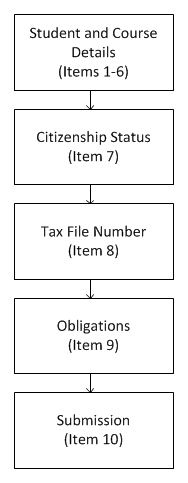
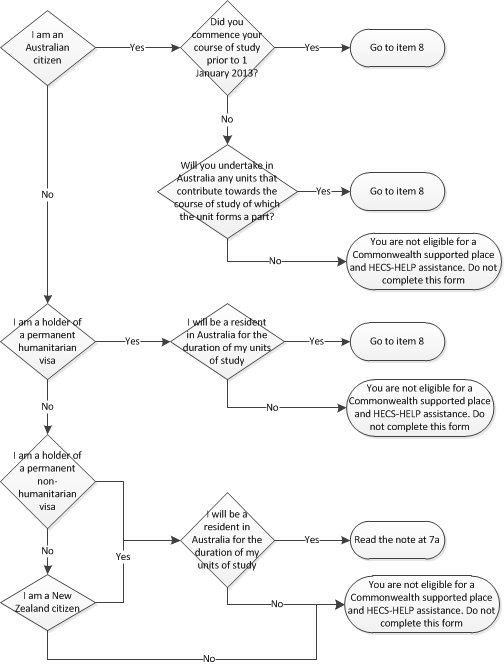
The sequence of screens in ECAF correspond to the hard copy forms for each type of Commonwealth assistance. The system determines the appropriate form of Commonwealth Assistance for the student and displays the appropriate application. This may be:
 |
|
A History of Student Status changes for this eCAF application is displayed in the Declaration History at the bottom of this application.
The student clicks on the Submit button to submit their application.
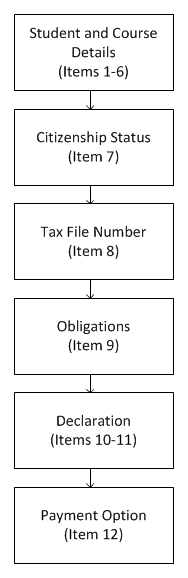 |
Item 10 further defines the student's obligations for the student to read before submitting their application.
In item 12, the student indicates how they wish to pay their student contribution. |
The student clicks on the Submit button to submit their application.
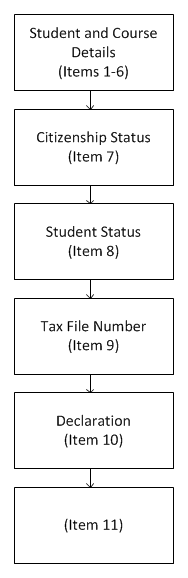 |
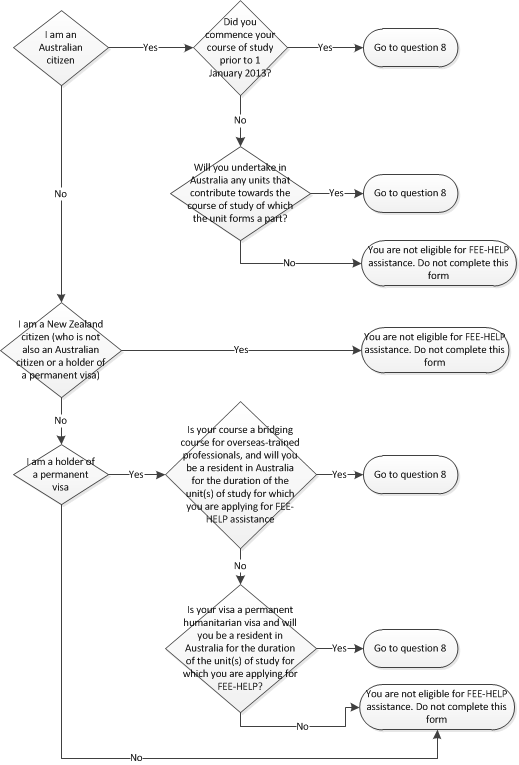
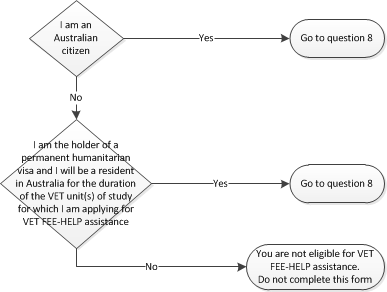
The student answers a series of questions for item 7 and eligibility for VETHELP assistance is determined according to the VETHELP Eligibility flow chart below.
Item 8 allows the student to nominate if they are full fee-paying or a subsidised student.
Item 8 allows the student to record their Tax File Number or indicate that they can provide a Certificate of Application for a TFN. Once submitted or recorded in the system, an existing TFN will be represented by #########.
Item 10 consists of a series of check boxes selected by the student to indicate that they understand their obligations relating to this application. These check boxes must be selected before their application can be submitted
Item 11 further defines the student's obligations for the student to read before submitting their application. |
A History of Student Status changes for this eCAF application is displayed in the Declaration History at the bottom of this application.
The student clicks on the Submit button to submit their application.
Once the student has submitted a VET FEE-HELP ECAF, the system determines the appropriate Government Student Status Code from 401-409. These codes can indicate that the student has deferred a state government subsidised course, so the system must determine if the course is state government subsidised and, if so, which state government is funding that course. This will be achieved by checking the local institution address and postcode to determine the state.
The codes 401-409 are defined as follows:
If a TFN
is not submitted with the initial form, another form, complete with all declarations
must be re-submitted.
Tax file
numbers submitted within an existing form will have the TFN recorded in the
STUDENT_ECAF_COMPLETION table and also the STUDENT_COURSE_HECS_OPTION table.
The system
allows a student to complete a eCAF, electing to defer the student contribution
without recording their TFN. The student is able to submit their TFN at another
time, but must do so prior to the applicable Census Date for the Enrolment Period,
or Enrolment will be cancelled.
Once a valid
TFN is entered and saved in the system, it cannot be accessed again using Connect
functionality.
Settings in SSFF1100 determine the system actions taken upon the submission of any of the ECAF forms. For the ECAF Self Serve Application:
After the email and receipt are successfully issued, then the transaction log will be updated to include that an email and or receipt was issued and the email address that it was issued to.
The fields to log and the sequence that they are logged in (Prompt, Old and New values), are displayed in the SELF_SERVE_TRANSACTION_DETAIL table below:
| Logging Sequence |
Prompt Name |
Old Value |
New Value |
1 |
Student Status |
*v_prev_stud_stat |
v_student_status |
2 |
Student Status Description |
*v_prev_stud_stat_desc |
v_student_status_desc |
3 |
Student Status Start Date |
*v_prev_stud_stat_start_dt |
SYSDATE |
4 |
Student Status End Date |
*v_prev_stud_stat_end_dt |
NULL |
**5 |
Course of Study Code |
p_course_cd |
p_course_cd |
**6 |
Name of Course of Study |
*v_crv_title |
*v_crv_title |
**7 |
Name of Higher Education provider |
*v_institution_name |
*v_institution_name |
**8 |
Campus |
*v_location_cd || ' - ' || v_loc_description |
*v_location_cd || ' - ' || v_loc_description |
**9 |
HECS Form Name |
p_form_name |
p_form_name |
**10 |
Question 8B |
p_statement_agree_1_ind |
p_statement_agree_1_ind |
**11 |
Question 9 |
p_statement_agree_2_ind |
p_statement_agree_2_ind |
**12 |
Question 10 |
p_statement_agree_3_ind |
p_statement_agree_3_ind |
**13 |
Student Identification Number |
p_person_id |
p_person_id |
**14 |
Given Names |
*v_given_names |
*v_given_names |
**15 |
Surname |
*v_surname |
*v_surname |
**16 |
Date of Birth |
*v_birth_dt |
*v_birth_dt |
**17 |
Gender |
*v_sex |
*v_sex |
***18 |
Tax File Number recorded |
*v_prev_tax_file_number |
*v_curr_tax_file_number |
* Denotes fields that need to be retrieved from the database prior to logging.
** Denotes that these values are logged with identical old and new values as there is no historic values to record.
*** Tax File Number. The TFN is not recorded. It does not have the students actual TFN. Only that it has been noted.
Some of the values logged are static and are not altered by the ECAF. These static values are:
Note: There are other fields that cannot be altered by the user, but do change as part of the processing. This means they have distinct old and new values and are not included in the table above.
ECAF Transaction details are logged into the Self Serve Transaction Detail table for static values, the old value and new value columns will always contain the same value. This data is included in the log as contextual reference for Administrators reviewing the log.
Last Modified on 21 March, 2014 2:45 PM
History Information
| Release Information | Project | Changes to Document |
| 15.1.0.3, 16.0.0.3, 16.1.0.2, 17.0.0.0 | 1845 - Compliance | Help page largely rewritten again. |
| 12.0.0.2 | 1617- VU - SV FEE-HELP | Added VET FEE-HELP information to intro and new section. |
| 11.1 | 1505 - Compliance 2008 | Removed references to HECS HELP - Pre 2005 |
| 10.1 | 1284 - Contingency Projects | Added note re Default Elect Payment |
| 10.0.0.0.0.0 | 1225 - Connect Transaction Management | Added 'Transaction Management' section |