
| Top of Precedents | Table of Contents | Index | Feedback | |
Related Pages - Workflow steps:
This is the Precedents 'landing' page - a gateway to creating and reviewing Advanced Standing and Course Entry Precedents.
From this page you can:
You can create the following types of Precedents:
A Precedent is created by linking two items (for example, an internal curriculum item to a related curriculum item). The following categories of Precedents are available:
To use this functionality, it is expected that you are an administrator who is authorised to create Precedents.
If searching for an existing Precedent, you can perform the following actions from the Search Results page:
Note: The default sort order for records when you first access this page is by Precedent ID, in sequential and descending order - with the most recent Precedent first. Both open and closed Precedents are listed.
If required, you can add additional search criteria to the Advanced Search by selecting a criteria from the Add Fields drop-down list of values, such as 'Updated By', 'Updated On' or 'Approving Staff Member'.
The Precedents (Landing) page (PRDW0400) is accessed directly from the main menu.
Navigation to and from the page is shown below.
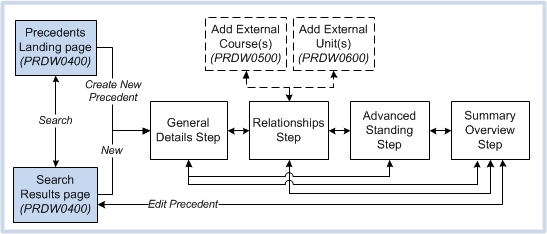
Figure 1: Page navigation for Precedents.
-------------------------------------------------------------------------------------------------
The following Security functions apply to the Precedent pages:
If a system user is assigned both the PRD-VIEW and PRD-DELETE Advanced Security functions, then PRD-VIEW overrides the PRD-DELETE function and the user can only view Precedents and cannot delete them.
The following table describes each field on the Precedents landing page.
These fields are optional and can be used to enter specific search criteria to find an existing Precedent.
Enter a value in one or more fields, then click the Search button to view a list of records on the Search and Results page. Alternatively to view a list of all Precedents, leave these fields blank and click the Search button.
| Field Title: | Description: | |
| Precedent ID | Enter the required Precedent ID number. This must be the exact ID number to return a result. Table value: |
|
| Internal Curriculum Item | Enter the full or partial value of the title and/or code of the Internal Course, Internal Unit (To), Course Type Group or Admission Band(s) belonging to the required Precedent. The list of search results will vary depending on whether this field is used on its own, or in conjunction with one or more of the other fields on this page. For Table values, see 'Field Descriptions for the Search Results Page', below. |
|
| Related Curriculum Item | Enter the full or partial title and/or code of the internal course, External Course, External Unit, Internal Unit (From), or Admission Band(s) belonging to the required Precedent. The list of search results will vary depending on whether this field is used on its own or in conjunction with one or more of the other fields on this page. For Table values, see 'Field Descriptions for the Search Results Page', below. |
|
| Precedent Type | Select an institution-defined Precedent Type from the drop-down selector on this field.
Table value: |
|
| External Institution | Select an external institution from the list of values on this field to search for a Precedent with an associated curriculum item owned by the selected external institution. This field is only valid for Precedents of the following Precedent Categories:
Table value: |
|
The following table describes each column in the Search Results table. All values are display-only.
Click the Expand icon (>) next to the Precedent ID to view additional details.
| Field Title: | Description: | |
| Precedent ID | Precedent ID number. This is a unique number automatically generated when the Precedent is created on the New Precedent page. Click the required Precedent ID to open the Precedent at the Summary Overview step from where you can view or modify the Precedent. Table value: |
|
| Precedent Category | The Precedent Category of the Precedent. Possible values are:
For more information, see the General Details Step (PRDW0410) Help page. Table value: |
|
| Internal Curriculum Item | The internal curriculum item, for example, an internal course, internal unit, course type group, or Admission Band. This field is a dynamic field. The values displayed here depend on the Precedent Category value, for example:
Table values: |
|
| Related Curriculum Item | The related curriculum item, for example, an internal or external course, internal or external unit, or Admission Band. This field is a dynamic field. The values displayed here depend on the Precedent Category value, for example:
Table values: |
|
| Precedent Type | The institution-defined Precedent Type. For more information, see the General Details Step (PRDW0410) Help page. Table value: |
|
| Precedent Status | The institution-defined status that is mapped to a System Status of DRAFT, ACTIVE, REVIEW, REJECTED or CLOSED. For more information, see the Summary Overview Step (PRDW0410) Help page. Table value: |
|
| Publish | Indicates if the Precedent is able to be published or not.
For more information, see the Summary Overview Step (PRDW0410) Help page. Table value: |
|
| Expanded Details | The following information is displayed when you click the Expand icon (>) next to a Precedent ID. | |
| External Institution | The external institution to which an associated curriculum item belongs. Only displayed when the Precedent Category is:
Table value: |
|
| Owning Org. Unit | The Organisational Unit to which the Precedent belongs. Table value: |
|
| Validity Period Start Date | The Validity Period Start Date of the Precedent. For more information, see the General Details (PRDW0410) Help page. Table value: |
|
| Validity Period End Date | The Validity Period End Date of the Precedent. For more information, see the General Details Step (PRDW0410) Help page. Table value: |
|
| Next Review Date | The Precedent's Next Review Date. For more information, see the General Details Step (PRDW0410) Help page. Table value: |
|
The following table describes each field in the Advanced Search section at the top of the Search Results page. These fields are used to perform a more refined search on the displayed list of records.
| Field Title: | Description: | |
| Precedent ID | Select an operator from the field Selector, then enter all or part of the Precedent ID number in the adjacent field. |
|
| Precedent Category | Select an operator from the field Selector, then select a Precedent Category from the Selector in the adjacent field. |
|
| Internal Curriculum Item | Select an operator from the field Selector, then enter all or part of the Internal Curriculum Item(s) title in the adjacent field. Possible items for this field are:
|
|
| Related Curriculum Item | Select an operator from the field Selector, then enter all or part of the related Curriculum Item(s) title in the adjacent field. Possible items for this field are:
|
|
| Precedent Type | Select an operator from the field Selector, then select an institution-defined Precedent Type from the Selector in the adjacent field. |
|
| Precedent Status | Select an operator from the field Selector, then select an institution-defined status from the Selector in the adjacent field. |
|
| Publish | Select an operator from the field Selector, then select Yes or No from the Selector in the adjacent field.
|
|
| External Institution | Select an operator from the field Selector, then select an external institution from the List of Values on the adjacent field. |
|
| Owning Org Unit | Select an operator from the field Selector, then select an Owning Organisational Unit from the List of Values on the adjacent field. |
|
| Duplicate Precedent ID | Select an operator from the field Selector, then in the adjacent field enter the Precedent ID that has been entered as a duplicate. |
|
Page last modified: 16 May, 2014 9:30 AM
History Information:
| Release Version | Project | Change to Document |
| 16.0.0.3, 16.1.0.2, 17.0 | 1991 - Monash Entry Precedents | Updated page for new Precedent Categories, and added new table for Advanced Search fields.. |
| 16.0.0.2, 16.1 | 1973 - Precedent UI | Updated page to match new user interface. |
| 15.0.0.2 | 1871 - Precedents - Part 1 | New page. |