
| Top of ADM | Index | Table of Contents | Feedback | |
This page is used to record an individual exemption for a student who is eligible for a USI exemption.
There are three exemption types that may apply for a student:
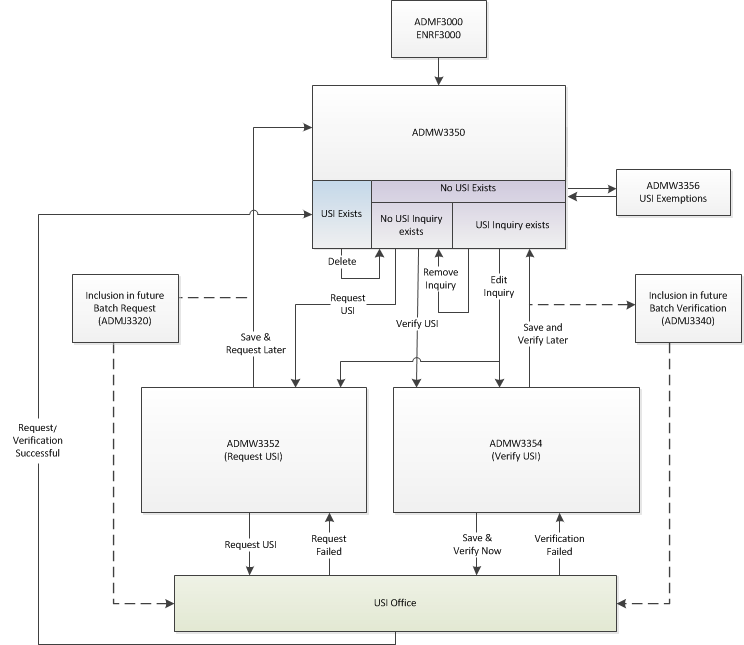
ADMW3356 is invoked by clicking on the USI Exemption button in ADMW3350.
Clicking on the Save or Cancel button In ADMW3356 returns the user to ADMW3350.
Context Student fields
| Field: | Description: |
|---|---|
| Person ID | Person ID of the person whose USI details are of interest. PERSON.PERSON_ID |
| Date of Birth | Birth date of the student PERSON.BIRTH_DATE |
| Surname | Surname of the student PERSON.SURNAME |
| Given Names | Given names of the student PERSON.GIVEN_NAMES |
Exemption Radio buttons
| Field: | Description: |
|---|---|
| International Student studying outside Australia radio button | Select this radio button to indicate that the student has been exempted from having a USI code. When this radio button is selected and saved, 'INTOFF' is recorded as the PERSON_USI and the current date is recorded as the Exemption Date in the PERSON_USI table. USI_PERSON.PERSON_USI /PERSON_USI.EXEMPTION_DT |
| Student Studying Short Course Exemption | Select this radio button to indicate that the student has been exempted from having a USI code. When selected and saved, 'SHORT' is recorded as the PERSON_USI and the current date is recorded as the Exemption Date in the PERSON_USI table. USI_PERSON.PERSON_USI /PERSON_USI.EXEMPTION_DT |
| Personal Objection Exemption radio button | Select this radio button to indicate that the student has been exempted from having a USI code. When selected, the Exemption code field will display (see below). |
| Exemption Code | This field is displayed and must be populated when Personal Objection Exemption button is selected (see above). The USI Exemption Code should be recorded here and this value is recorded for the student in place of the USI code and the current date is recorded as the Exemption Date in the PERSON_USI table. USI_PERSON.PERSON_USI /PERSON_USI.EXEMPTION_DT |
Lamps
ADMW3350 - Student USI Details
ADMW3352 - Request USI
ADMW3354 - Verify USI
ADMJ3320 - Batch USI Request
ADMJ3340 - Batch USI Verify
Page last modified: 26 April, 2017 1:37 PM
History Information:
| Release Version | Project | Change to Document |
|---|---|---|
| 19.0.0.3, 19.1.0.2 | 2262 - Compliance USI | Added details for Short Course radio button. |
| 18.0.0.3, 18.1.0.3, 19.0.0.1 | 2173 - Compliance 2016 | New Help page |