| Top of STA | Index | Table of Contents | Feedback | |
STAJ2040 - Export VET Student Loans Student Data for Progression Survey
| Purpose |
To export data for students who are receiving VSL loans, from Callista SMS to the Government eCAF Site |
| SubSystem |
Statistics |
| Normally Run By | Statistics specialist |
| Anticipated Frequency | On demand |
| Structure | No parameter form |
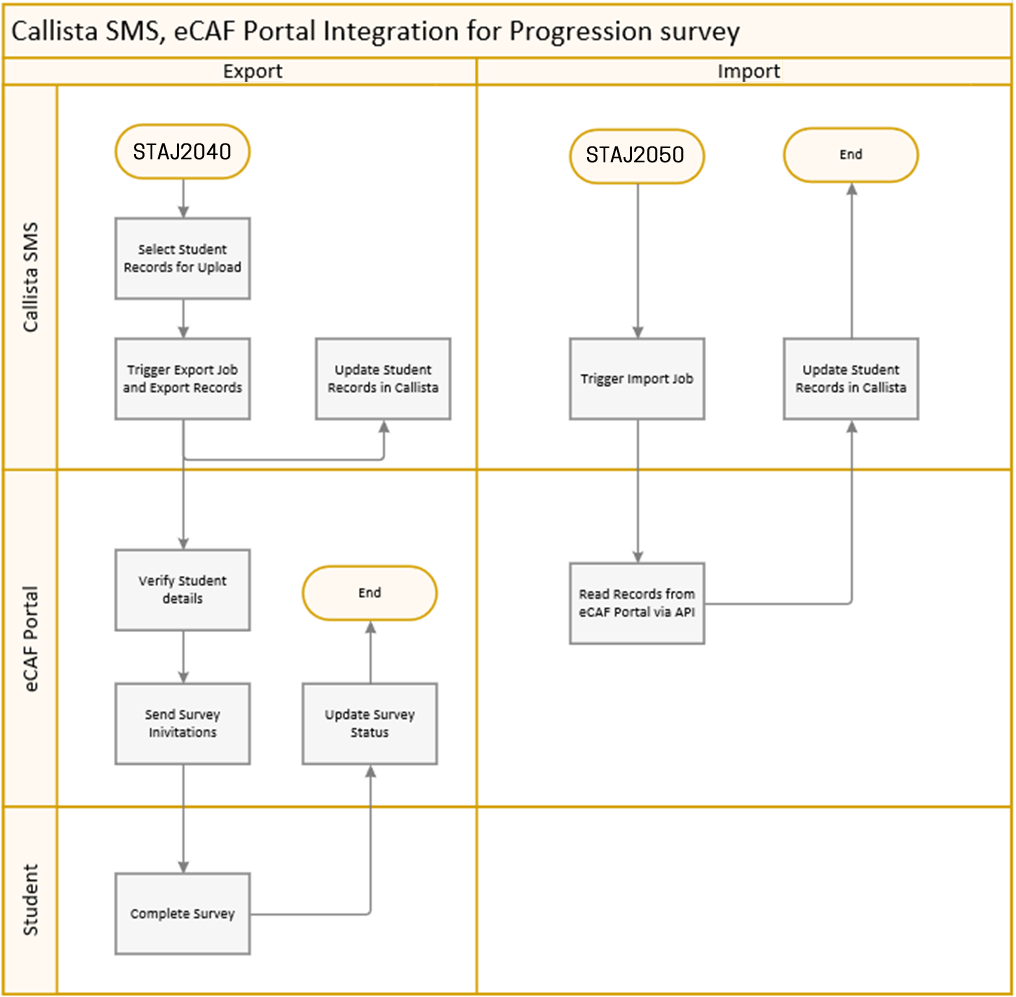
For VET students to continue to receive a VET student loan, they are required to demonstrate to the government that they are continuing with their studies. Before the student can complete the survey their education provider must enter their details into the eCAF system. This can be achieved by manual and bulk upload processes or by automatic uploads using the eCAF API via the STAJ2040 job. In STAJ2040, APIs are used to create an interface between the eCAF system and the Callista SMS and details for students who are receiving VSL loans are transferred from Callista SMS to the Government eCAF Site using the web services via an automatic process. A Progression Survey is triggered via an automatic process for students based on the following criteria:
If an eCAF ID does not exist for a student course attempt, the export process will first fetch the eCAF ID from eCAF Portal, save it in the Callista database and then export data for the Progression survey. Progression Survey invitations are triggered once this data is uploaded to the eCAF Portal. The eCAF Portal allows 14 days for students to complete the survey upon receiving an invitation. On completion of Progression Survey or expiry of allocated time, the status and outcome are updated in the eCAF Portal. Following this, another job, STAJ2050 can be used to import data back from the eCAF Portal. This populates the Progression Survey T-list item in ENRF3000.
STAJ2040 is only available to VET sector and cross sector institutions. STAJ2040 is accessed via the main menu. No parameters exist for this job. |
Configuration For the system configuration required to connect with the eCAF Portal refer to eCAF Portal Configuration. Processing
|
| Technical Information Tribal Callista interacts with the Government Web Services to manage all aspects of dealing with an external API, including authentication when calling the API and managing the response details to correctly record audit details and process error details appropriately. The Government API uses HTTP status codes to indicate the success or failure of a request. Error codes are returned with a JSON object in the body containing a message providing further details on the error. The version 2(1302B-2017) API for the VET Student Loans eCAF provided by the Government eCAF site is used to import the student status information to the Callista SMS. |
Last Modified on 03-Jul-2017 1:17 PM
History Information
| Release Version | Project | Change to Document |
| 20.0.0.2 & 21.0.0.3 | 2366 - VSL Progression | New Online Help page. |