| Top of ENR | Index | Table of Contents | Feedback | |
ENRF0180 - Maintain External Study Loan Status
| Purpose | To enable the creation and maintenance of External Study Loan Scheme Statuses | |
| SubSystem | Enrolments | |
| Normally Run By | Enrolments Specialist | |
| Anticipated Frequency | As required | |
| Structure | Block | External Study Loan Status |
|
This form provides institutions with the ability to maintain institution-specific values for the system-defined External Study Loan Statuses. These will then be used throughout the system to define the current status of the Student Course External Study Loan. You can access this form the Main Menu. |
The External Study Loan Status block contains:
|
Rules/Notes: |
||||||||||||||
To
create a new External Study Loan Status using the Maintain External Study
Loan Status form:
|
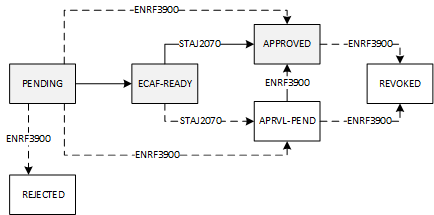
Rules/Notes: Each institution-defined External Study Loan Status MUST be unique. An institution-defined External Study Loan Status cannot be mapped to a closed External Study Loan Status. A closed institution-defined External Study Loan Status cannot be reopened if it is mapped to a closed External Study Loan Status. System status values:
The way in which statuses (in ENRF3900) may change during processing is shown in the flow chart below.
|
||||||||||||||
| To modify an External Study Loan Status using the Maintain External Study Loan Status form:
|
Rules/Notes: An External Study Loan Status should only be modified where the change is to correct an incorrectly entered Description, Comments or Explanation. |
||||||||||||||
To delete an External Study Loan Status using the External Study Loan Status form:
|
Rules/Notes: If an
External Study Loan Status has been assigned to an External Study Loans
Scheme, it cannot be deleted. It can be closed, preventing any further
use, by selecting the Closed check box |
Last Modified on 04-Mar-2019 2:17 PM
History Information:
| Release Version | Project | Change to Document |
| 19.1.0.3, 20.0.0.3 & 21.0.0.2 | 2368 - OS-HELP eCAF | Added ECAF-READY and APRVL-PEND System Status values. |