| Top of ENR | Index | Table of Contents | Feedback | |
ENRF3900 - Maintain Student Course External Study Loan
| Purpose | To enable the recording and maintenance of Student Course External Study Loan. | |
| SubSystem | Enrolments | |
| Normally Run By | Enrolment Specialist | |
| Anticipated Frequency | As required | |
| Structure | Blocks | Student Course Attempt |
| Student Course External Study Loan | ||
This form provides the ability to associate an External Study Loan, such as OS-HELP, with a Student Course Attempt. OS-HELP details are reported to the government by STAJ0160. STAJ2060 and STAJ2070 interact with the Government eCAF Portal to check the validity of the data and transfer it between the two systems. You
can access this form directly from the menu and Student
Course Attempts can be queried in the Student Course Attempt block. The Student Course External Study Loan Block allows the display and maintenance of external study loans for the student. Using ENRF3900, an Asian Language Supplement loan (student status 242) may be recorded in association with an Asian Studies loan (student status 241). To link these loans, the Study Period Commencement Date for the the Language Supplement Loan must be the same as the Language Study Commencement date recorded for the Asian Studies loan. |
The Student Course Attempt block contains:
Buttons
The Student Course External Study Loan block contains: The fields displayed in this block are affected by the Loan Scheme.
For Asian Language Study Supplement loans only,the following fields are displayed after the Description field:
|
Rules/Notes: If a student is encumbered, the ENCUMBERED lamp will display in the Student Course Attempt block. Note: Loan schemes are defined in FINF1S00. The Study Period Commencement Date may differ
for each individual student. The Incurral Date is set by an administrator, based on when the student was paid their OS-HELP loan. This date is reported to the government in the OS-HELP file. Statuses map to the following System Study Loan Status values:
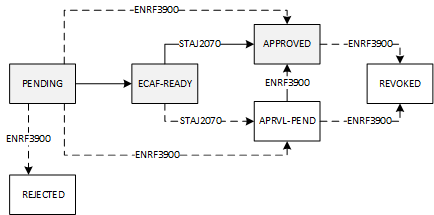
To see how Study Loan Statuses can change during processing refer to the flow chart below.
The Loan Fee is calculated in this form when the loan amount is saved. The Loan Fee calculation is dependent on ENRF0185. The Loan Amount recorded will be validated against the Minimum and Maximum Loan Amounts in ENRF0185. A Tax File Number or Tax Certificate number are required for loan schemes apart from Asian Study Language Supplement OS-HELP loans (student status 242). Using ENRF3900, an Asian Language Supplement loan (student status 242) may be recorded in association with an Asian Studies loan (student status 241). To link these loans, the Study Period Commencement Date for the the Language Supplement Loan must be the same as the Language Student Commencement date recorded for the Asian Studies loan. A validation checks that the Language Study Commencement Date being set for an Asian Studies loan (student status 241) matches the Study Period Commencement date for the corresponding Asian Study Language Supplement Loan (student status 242) . However this validation warning message will only appear if the loans are approved. The Primary Country of Study is the country of study in which the student will receive the most credit. If a student receives equal amounts of credit for study in different countries, the Primary Country of Study is the first country in which the student receives credit. The Secondary Country of Study is the country of study in which the student will receive the second most amount of credit. If a student receives equal amounts of credit for study in different countries, the secondary country is the second country in which the student receives the most credit. When recording an Asian Studies Loan (student status 241), the Primary and Secondary Country of Study must be marked as 'Eligible for OS-HELP Study' in Asia in ENRF0120. The 'OS-HELP eCAF Eligible' check box is used to indicate that the student is eligible for an OS-HELP loan. The selection of this check box, along with the setting of the Status to ECAF-READY, is required to prompt the inclusion of the record for export to HEIMS via STAJ2060. The 'OS-HELP Exported to eCAF' check box is set when the External Study Loan record has been exported, without errors, to the eCAF Portal via the STAJ2060 job. Records which have this check box selected will not be re-exported. If the OS-HELP Exported to eCAF check box is manually updated, a warning message is displayed. The 'HELP Eligible NZ Citizen' check box can only be selected if the student's statistical record (ENRF3060) indicates that they are a NZ citizen (Govt Citizenship Code = 2 or is null). If the student is a NZ citizen, an OS-HELP record can only be created if the 'HELP Eligible NZ Citizen' check box is selected. If the student's statistical record (ENRF3060) indicates that they have been in Australia for less than 10 years or that they were more than 18 years old when they arrived in Australia, then selecting the 'HELP Eligible NZ Citizen' check box will generate a warning. If the 'HELP Eligible NZ Citizen' check box is changed so as to be inconsistent with the settings for the corresponding check boxes in ENRF3110 or ENRF3240, then a warning is generated. |
| Creating a Course External Study Loan Record for a Student Course Attempt:
|
Rules/Notes: A warning will display if you attempt to create a loan record for a Student Course Attempt with a status which is not ENROLLED, INTERMIT or INACTIVE. It is only possible to create another OS-HELP loan for a student if the Study Period Commencement Date is six months after the Commencement Date of any existing OS-HELP loan. Asian Studies loans (student status 241) with their associated Asian Study Language Supplement loans (student status 242) are the only exception to this rule. The
Loan Fee calculation uses the rule that is associated with the External Study
Loan Scheme in ENRF0185.
It
is not possible to enter the Loan Fee in the form - this value can only
be populated by the system. If the Status is set to APPROVED, then a Tax File Number or Tax File Certificate Number must also be recorded. The
Tax File Number is protected from view in this form. If the Status is set to APPROVED, then the student must have a validated CHESSN with a status of ACTIVE or PROVISIONL. If the student status for the student loan scheme is 240 and a country in which study occurs is one which is marked as 'Eligible for OS-HELP Study in Asia' in ENRF0120, then the user will be advised to change the loan to one which maps to a status of 241. If the Tax File Number is deleted the Tax File Number Recorded Date and the Tax File Number Invalid Date are both set to null. Where the Loan Scheme is mapped to a Government Student Status of 240 or 241, if the Status is set to a value of ‘APPROVED’ and the TFN Invalid Date is set, then a warning is generated. For an Asian Language Study Supplement (student status 242), if the External Study Loan Status is updated to ECAF-READY and the Study Period Commencement Date or Incurral Date or Language of Study is null, then an error is generated. If the Language Study Commencement Date is defined for an Asian Language Study Supplement loan (student status 242) with a Status of ECAF-READY, APRVL-PEND or APPROVED and a matching Study Period Commencement Date does not exist, then a warning is generated. For an Asian Language Study Supplement loan (student status 242), when the loan status is updated to ‘ECAF-READY’ or ‘APRVL-PEND’, if the Study Period Commencement Date or Language of Study fields are null, then a warning is generated. For an Asian Language Study Supplement loan (student status 242), when the loan status is updated to ‘ECAF-READY’, ‘APRVL-PEND’ or APPROVED, if an associated record mapped to Government student status of 241 does not exist, then a warning is generated. Where the Loan Scheme is mapped to a Government Student Status of 240 or 241, if the loan status is set to a system value of ‘ECAF-READY’ or ‘APRVL-PEND’ when the Study Period Commencement Date & Primary Country of Study are not set, then an error is generated. Where the Loan Scheme is mapped to a Government Student Status of 241 or 242, a warning is generated if the loan status is updated to APPROVED when there is a value recorded for the TFN Invalid Date. |
Deleting a Course External Study Loan Record for a Student Course Attempt:
|
Rules/Notes: Once the Incurral Date is set, an External Study Loan record cannot be deleted. If an Asian Studies loan that is currently matched to an Asian Language Supplement (student status 242) is deleted. A warning displays to advise that, by making this change, that supplement will no longer be matched to this loan. |
The flow chart below shows interactions between Callista SMS and HEIMS via STAJ2060 and STAJ2070.

Last Modified on 04-Mar-2019 2:18 PM
History Information:
| Release Version | Project | Change to Document |
| 19.1.0.3, 20.0.0.3 & 21.0.0.2 | 2368 - OS-HELP eCAF | Included OS-HELP Eligible and OS-HELP Exported to eCAF check boxes and added new validations relating to the ECAF-READY status and information relating to HEIMS import/export jobs. |
| 18.0.0.3, 18.1.0.3 & 19.0.0.1 | 2173 - Compliance 2016 | Included information for HELP Eligible NZ Citizen check box. |
| 17.0.0.3, 17.1.0.3 & 18.0.0.2 | 2110 - Calipso 41540 | Help page reorganised. |
| 15.1.0.3, 16.0.0.3 & 16.1.0.0.2 | 1845 - Compliance | Added new fields and validations relating to the Asian Language Supplement loan scheme |
| 11.0.0.3 | 1618 - SA Fee HELP | Added information relating to TFN checking. |
| 10.1 | 1340 - Compliance 2007 Pt 2 | Added details re Check OS-HELP Balance button. |