
| Top of ADM | Index | Table of Contents | Feedback | |
ADMW3352 enables a user to record and review the data required to request a USI for a student. The user can then submit that request immediately or save it later for batch processing.
This page contains a wizard which indicates the user's progress through this process and enables direct navigation to other steps in the process.
The steps involved in the process are described below.
This screen displays personal details required for the creation of a USI. This screen is pre-populated with the student's details from Callista SMS.
Each field can be edited by the user and additional information can be added if required. If a field is updated by a user, the updated value will be used in the request but is NOT saved back into the source location.
All data, whether retrieved from other areas of the SMS or collected or updated as part of this process, will be stored against a single record in the USI_PERSONAL_DETAIL table with a transaction type of REQUEST. This record will contain all personal and Evidence of Identity data, and will be used by the immediate and batch USI request processes.
This screen is used to gather information from a valid EOI document. It is dynamic, based on the document type selected.
An Evidence of Identity document is not mandatory for some higher education providers. The government has recognised that some providers have remote indigenous students or prisoners for example, that do not have these documents. Special permission will be granted to these higher education providers. This permission will be stored via a setting in ORGF0120. When this setting indicates the institution does not have to capture EOI information, the Evidence of Identity Type list will contain an option of ‘NON-DVS DOCUMENT’.
The EOI information provided by the student will be recorded in the same USI_PERSONAL_DETAIL record as the personal details above.
This screen summarises the student's information, with the options to go back and change anything previously entered. The user also has the option to submit the request for a USI immediately, or to save the information for a batch request at a later date.
When the user elects to submit immediately, by clicking on the Submit Request button, the request process will run, submitting this student's data to the USI office.
When the user elects to submit late, by clicking on the Save & Request Later button, the student data will be saved and included in a batch request to the USI office (ADMJ3320).
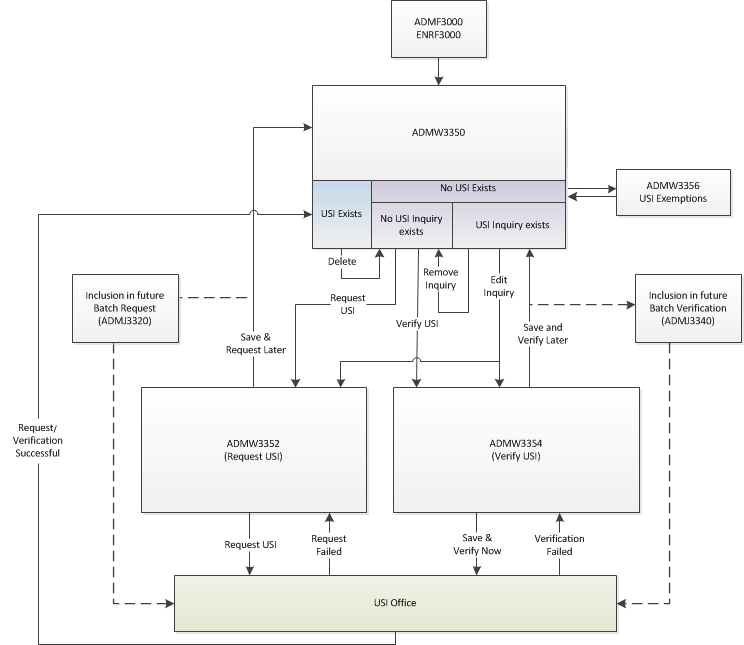
The screen will be displayed when the user clicks on the Request USI button on the USI landing page (ADMW3350) .
From this page the user can opt to request the Student USI now or else to include this Student USI in the next Batch Request process (SD.
Person Details
This page displays details stored in the USI_PERSONAL_DETAIL table which is populated from values in Callista SMS and also by direct entries onto this page. Details on this page updated for the purpose of requesting a USI will not be saved back to the PERSON table in Callista SMS.
Administrators must supply at least two of the following forms of contact details when requesting a USI on behalf of a student: Email Address, Postal Address or Telephone Number.
| Field: | Description: | |
|---|---|---|
| First Name | The first name of the student. This field is mandatory when it is displayed. It is pre-populated with the first part before a space in PERSON. GIVEN_NAMES. USI_PERSONAL_DETAIL.FIRST_NAME |
These fields are visible when the Yes radio button is selected for the 'Does the student have both a First name and a Family name? ' question. The fields are pre-populated when USI_PERSONAL_DETAIL.SINGLE_NAME |
| Preferred First Name | The preferred first name of the student. This field is only visible when the Preferred First Name check box is selected and is mandatory when it is displayed. It is pre-populated with the part before the first space in PERSON. GIVEN_NAMES but can be edited here. USI_PERSONAL_DETAIL.PREFERRED_FIRST_NAME |
|
| Middle Name | The middle name(s) of the student, separated by spaces. Pre-populated with the part following the first space in PE.GIVEN_NAMES column USI_PERSONAL_DETAIL.MIDDLE_NAME |
|
| Family Name | The surname of the student. Mandatory if the student has a First Name and a Family Name. The field is mandatory when it is displayed. It is pre-populated the value from PERSON.SURNAME. USI_PERSONAL_DETAIL.FAMILY_NAME |
|
| Preferred Family Name | The preferred family name of the applicant. This field is visible only when Preferred family name checkbox is checked and is mandatory when it is displayed. USI_PERSONAL_DETAIL.PREFERRED_FAMILY_NAME |
|
| Name |
The student's single name. This field is mandatory when it is displayed and must not contain numbers. USI_PERSONAL_DETAIL.SINGLE_NAME |
These fields are displayed, instead of the five fields above, when the 'No' radio button is selected for the 'Does the student have both a first name and a family name? ' question. i.e. No middle name or family name. |
| Preferred Name | If the Preferred Name check box is selected this field must be populated. USI_PERSONAL_DETAIL.PREFERRED_SINGLE_NAME |
|
| For the Name fields above valid characters are: upper case A-Z, lower case a-z, hyphen, apostrophe, single quote, space and fullstop. Each name entry must contain an alphabetic character and cannot start or end with a non-alphabetic character. Consecutive non-alphabetic characters are not permitted except for a fullstop followed by a space. | ||
| Gender | The gender of the student, pre-populated with the value from PERSON.SEX. This field will display the following values:
When they click on OK, they will remain on the Person Details page where they will either change the gender or click on Cancel to go back to ADMW3350. USI_PERSONAL_DETAIL..GENDER |
|
| Date of Birth | The day, month and year of birth of the student, pre-populated with the value from PERSON.BIRTH_DT USI_PERSONAL_DETAIL..DATE_OF_BIRTH |
|
| Country of Birth | The country where the student was born. When a user selects a description (country's name) from the LOV the system actually stores the associated Government Country Code (as defined in STAF1124). The matching Government Country Code is sent to the government along with the student’s details as part of the Request or Verify USI request.
USI_PERSONAL_DETAIL.COUNTRY_OF_BIRTH |
|
| Town City of Birth | The name of the town or city where the student was born. USI_PERSONAL_DETAIL.TOWN_CITY_OF_BIRTH |
|
| Country Studying In | The country in which the student is studying. The default value is Australia. When a user selects a description (country's name) from the LOV the system actually stores the associated Government Country Code (as defined in STAF1124). The matching Government Country Code is sent to the government along with the student’s details as part of the Request or Verify USI request. USI_PERSONAL_DETAIL.COUNTRY_STUDYING_IN |
|
| Country of Residence | The student's primary country of residence. The default value is Australia. When a user selects a description (country's name) from the LOV the system actually stores the associated Government Country Code (as defined in STAF1124). The matching Government Country Code is sent to the government along with the student’s details as part of the Request or Verify USI request. USI_PERSONAL_DETAIL.COUNTRY_OF_RESIDENCE |
|
| Email Address | The email address of the student, pre-populated with the value from PERSON_ADDR_POSTAL_USI_V. EMAIL_ADDR. This field is mandatory only when USI_PERSONAL_DETAIL.PREFERRED_COMMUNICATION _METHOD is Email. NVL(USI_PERSONAL_DETAIL.EMAIL_ADDRESS,PERSON.EMAIL_ADDR) |
|
| International Address | The overseas address of the student. Only displayed if Country of Residence is not Australia. Mandatory when Country of Residence is not Australia. USI_PERSONAL_DETAIL.INTERNATIONAL_ADDRESS |
|
| Address 1 | Line 1 of the student 's address - may be pre-populated from PERSON_ADDR_POSTAL_USI_V.ADDR_LINE_1Only displayed if Country of Residence is Australia. Mandatory when Country of Residence is Australia and PREFERRED_METHOD is 'MAIL'. USI_PERSONAL_DETAIL.ADDRESS_1 |
|
| Address 2 (National) | Line 2 of the student 's address - may be pre-populated from ENRF3030. Only displayed if Country of Residence is Australia. USI_PERSONAL_DETAIL.ADDRESS_2 |
|
| Suburb Town City | The suburb/town/city for the Applicant's home residence - may be pre-populated from ENRF3030. Only displayed if Country of Residence is Australia. Mandatory when Country of Residence is Australia. USI_PERSONAL_DETAIL.SUBURB_TOWN_CITY |
|
| State | The State abbreviation for the student's home address - may be pre-populated from ENRF3030. May be NSW, VIC, QLD, SA, WA, TAS, NT or ACT. Only displayed if Country of Residence is Australia. Mandatory when Country of Residence is Australia. USI_PERSONAL_DETAIL.STATE |
|
| Postcode | The Post Code of the student's address - may be pre-populated from ENRF3030. Only displayed if Country of Residence is Australia. Mandatory when Country of Residence is Australia. USI_PERSONAL_DETAIL.POSTCODE |
|
| Home Phone | Home phone number for the student - may be pre-populated from ENRF3030. This value may contain a '+' in the first place and digits, spaces or hyphens in the others. USI_PERSONAL_DETAIL.HOME_PHONE |
|
| Mobile Phone | Mobile phone number for the student - may be pre-populated from ENRF3030. If the Country of Residence is Australia , the mobile number must begin with 04, and be followed by 8 digits. If the Country of Residence is not Australia, the mobile number must start with + and be followed by 10 digits. USI_PERSONAL_DETAIL.MOBILE_PHONE |
|
Evidence of Identity
On reaching this stage, the user firstly nominates the Evidence of Identity value which then determines the other fields displayed. e.g. If Driver's Licence is selected then Licence Number and State fields will display.
When details for each Evidence of Identityis recorded, the user
clicks on the Next button and selects another Evidence of Identity value
| Field: | Description: | |
|---|---|---|
| Evidence of Identity Type | The type of evidence provided by the applicant. Selection here determines the other fields displayed on this screen. Select from: BIRTH CERTIFICATE CERTIFICATE OF REGISTRATION BY DESCENT CITIZENSHIP CERTIFICATE DRIVER LICENCE IMMIGRATION CARD MEDICARE CARD PASSPORT VISA NON-DVS DOCUMENT 'None Provided' is displayed if the institution has clearance from the USI Registry to submit a USI request without a DVS (Document Verification Service) ID document. (The local institution has the Allow DVS Override check box selected in ORGF0120). USI_PERSONAL_DETAILS..S_EVIDENCE_OF_IDENTITY_TYPE |
|
| Registration Number | Registration Number on the Birth certificate. USI_PERSONAL_DETAIL.EVIDENCE_FIELD_1 |
Displayed for BIRTH CERTIFICATE |
| Registration State | State or Territory where the Birth certificate was issued. May be SA, VIC, WA, NSW, TAS, QLD, NT or ACT. USI_PERSONAL_DETAIL.EVIDENCE_FIELD_2 |
|
| Registration Date | Registration Date on the Birth certificate. USI_PERSONAL_DETAIL.EVIDENCE_FIELD_3 |
|
| Registration Year | Registration Year on the Birth certificate. USI_PERSON_DETAIL.EVIDENCE_FIELD_4 |
|
| Date Printed | Date Printed on the Birth certificate. USI_PERSON_DETAIL.EVIDENCE_FIELD_5 |
|
| Certificate Number | Certificate Number on the Birth certificate. USI_PERSON_DETAIL.EVIDENCE_FIELD_6 |
|
| Acquisition Date | Acquisition Date on Document. USI_PERSON_DETAIL.EVIDENCE_FIELD_1 |
Displayed for CERTIFICATE OF REGISTRATION BY DESCENT |
| Stock Number | Stock Number on Citizenship certificate USI_PERSON_DETAIL.EVIDENCE_FIELD_1 |
Displayed for CITIZENSHIP CERTIFICATE |
| Acquisition Date | Acquisition Date on Citizenship certificate' USI_PERSON_DETAIL.EVIDENCE_FIELD_1 |
|
| Licence Number | License Number on Driver's Licence. USI_PERSON_DETAIL.EVIDENCE_FIELD_1 |
Displayed for DRIVER LICENCE |
| State | State on Driver's Licence. USI_PERSON_DETAIL.EVIDENCE_FIELD_2 |
|
| Card Number | Card Number on Medicare Card USI_PERSON_DETAIL.EVIDENCE_FIELD_1 |
Displayed for MEDICARE CARD |
| Reference Number | Reference Number on Medicare Card USI_PERSON_DETAIL.EVIDENCE_FIELD_2 |
|
| Card Colour | Colour of their Medicare Card. May be BLUE, GREEN or YELLOW. USI_PERSON_DETAIL.EVIDENCE_FIELD_4 |
|
| Expiry Date | Expiry Date on their Medicare Card. yyyy-mm when Card Colour is Green yyyy-mm-dd when Card Colour is Blue or Yellow. USI_PERSON_DETAIL.EVIDENCE_FIELD_3 |
|
| Name (Line 1) | Applicant's first name line on their Medicare card USI_PERSON_DETAIL.EVIDENCE_FIELD_5 |
|
| Name (Line 2) | Applicant's second name line on their Medicare card USI_PERSON_DETAIL.EVIDENCE_FIELD_6 |
|
| Name (Line 3) | Applicant's third name line on their Medicare card USI_PERSON_DETAIL.EVIDENCE_FIELD_7 |
|
| Name (Line 4) | Applicant's fourth name line on their Medicare card USI_PERSON_DETAIL.EVIDENCE_FIELD_8 |
|
| Document Number | Passport number of Australian Passport. Must be current or expired for less than two years. USI_PERSON_DETAIL.EVIDENCE_FIELD_1 |
Displayed for PASSPORT |
| Passport Number | Passport Number to which the visa was issued. USI_PERSON_DETAIL.EVIDENCE_FIELD_2 |
Displayed for VISA |
| Country of Issue | The country that issued the Passport for which the visa was issued. USI_PERSON_DETAIL.EVIDENCE_FIELD_3 |
|
| ImmiCard Number | Number on Immicard. First three characters are A-Z followed by 6 digits. USI_PERSON_DETAIL.EVIDENCE_FIELD_1 |
Displayed for IMMIGRATION CARD |
| Customer Reference Number (CRN) | Mandatory field for this evidence type USI_PERSONAL_DETAIL.EVIDENCE_FIELD_1 |
Displayed for Centrelink Concession Card |
| Card Type | Values defined in ADMF3252. USI_PERSONAL_DETAIL.EVIDENCE_FIELD_2 |
|
| Expiry Date | Card expiry date USI_PERSONAL_DETAIL.EVIDENCE_FIELD_3 |
|
| Primary Cardholder | Check box selected if this person is the primary card holder. USI_PERSONAL_DETAIL.EVIDENCE_FIELD_4 |
|
| First Name | First Name of Cardholder USI_PERSONAL_DETAIL.EVIDENCE_FIELD_5 |
|
| Middle Initial | Middle Initial of Cardholder USI_PERSONAL_DETAIL.EVIDENCE_FIELD_6 |
|
| Family/Last Name | Family/Last Name of Cardholder USI_PERSONAL_DETAIL.EVIDENCE_FIELD_7 |
|
| Document Type | This list is generated via a web service call to retrieve the document types available based on the org_cd of the institution. Use the 'Refresh List' link to retrieve the current Document types. USI_PERSON_DETAIL.EOI_TYPE_ID |
Displayed for NON-DVS DOCUMENT This option is available only if the 'Allow DVS Override' check box is selected for the Local institution in ORGF0120. |
| Please Specify | Visible only when the Evidence of Identity Type is Other. This is a free text field for the user to enter the document type sighted when 'Other' is selected. An entry is mandatory when 'Other' is selected and this field cannot exceed 50 characters and must not contain numbers USI_PERSON_DETAIL.EOI_OTHER_TYPE |
|
ADMW3350 - Student USI Details
ADMW3354 - Verify USI
ADMJ3320 - Batch USI Request
ADMJ3340 - Batch USI Verify
Page last modified: 12 May, 2021 1:05 PM
History Information:
| Release Version | Project | Change to Document |
|---|---|---|
| 22.1.0.3, 23.0.0.3, 23.1.0.3 & 24.0.0.1 | 2516 - USI dentification | Added Centrelink Concession Card EOI details. |
| 22.0.0.3, 22.1.0.3, 23.0.0.3 & 23.1.0.1 | 2498 - USI into HE | Added note about contact details requirements. |
| 21.0.0.3, 22.0.0.3 & 22.1.0.2 | 2463 - USI TSC | Updates to Person Details and Evidence of Identity |
| 18.0.0.3, 18.1.0.3 & 19.0.0.2 | 2173 - Compliance | Added new validations for Person Details fields, removed Preferred Method field and added details for NON-DVS Documents. |
| 17.0.0.3, 17.1.0.3 & 18.0.0.1 | 2062 - USI | New Help page |