
| Top of RES | Index | Table of Contents | Feedback | |
The Research subsystem is used to manage all processes relating to postgraduate research students within an institution. These are postgraduate students who have applied for or enrolled in a Research Course and Unit.
When a student makes an application for Admission to a Research Course, the Admissions process allows navigation to the Research Candidature Details form (RESF3211). This form is used to record specific information about their Candidature. Some details must be recorded before an offer of a place can be made. These are: Research Topic, expected Submission Dates (which can be the system-calculated Dates) and a Principal Supervisor. Other non-mandatory Candidature and Thesis details can be entered at this stage if known, or at any time over the Candidature period.
The student is pre-enrolled in the course when the Mandatory Candidature details exist and an offer of a place is made by the institution. If the Student Course Attempt is entered directly through the Enrolments subsystem (using ENRF3000) pre-enrolment is done through the running of a batch job (ENRJ3100), scheduled by an Enrolment specialist.
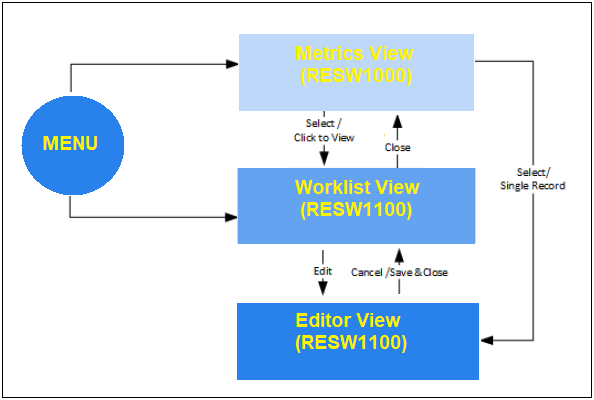
RESW1000 enables Research administrators to view the basic candidature information for sets of Research students as determined by searches and selections made via the charts displayed. Further Candidature details may also be viewed by selecting particular records and viewing them in RESW1100. There is also the opportunity to update some of the Candidature information on that page.
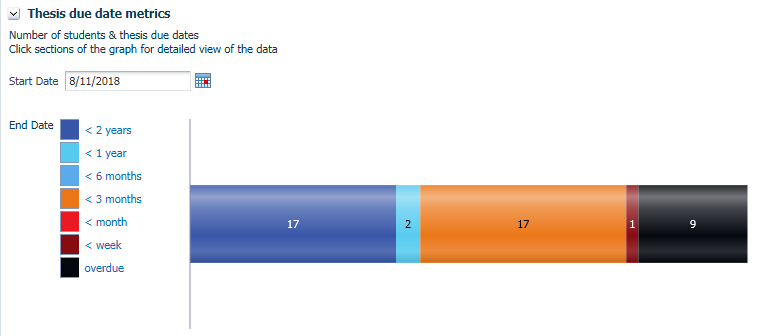
A graph displays the number of research students with certain ranges of time until their thesis is due.
By default, today’s date is selected as the Start Date, but Users may choose to select a future date to find how many students will have their Thesis due from that date.
Click on a segment in the graph to display the research students, in RESW1100, with that range of time until their thesis is due.
This function uses the Start Date entered here and the
Expected Submission Date for the Thesis (THESIS_V.EXPECTED_SUBMISSION_DATE) in determining the days until submission.
Users can search for Candidature records using the Person ID, Person Name, Course Version and Course Name fields.
| Column Heading | Description |
|---|---|
| Person ID | Person ID of the student PERSON.PERSON_ID |
| Name | Any part of Surname, Title or Given Names. PERSON.SURNAME+, +PERSON.TITLE+ +PERSON.PREFERRED_GIVEN_NAMES |
| Course Version | Course Code and Version of the Student Course Attempt COURSE_VERSION.COURSE_CD+.+COURSE_VERSION.VERSION_NUMBER |
| Course Commencement Date | Commencement Date for the Student Course Attempt for which this candidature exists. Users specify a From and To Date range. HDR student records that fall within the specified date range are brought back by the search. Users must specify both dates for the search to work. STUDENT_COURSE_ATTEMPT.COMMENCEMENT_DT |
| Research Commencement Date | This is the date the candidate commences their research and can be on or after the Course Comm Date. This date is used in attendance and submission date calculations and in EFTSL calculations. If a Research Comm Date is not recorded, research is considered to commence on the Course Comm Date. Users specify a From and To Date range. HDR student records that fall within the specified date range are brought back by the search. Users must specify both dates for the search to work. CANDIDATURE_V.RESEARCH_COMMENCEMENT_DT |
| Milestone Type | The type of Milestone. These are defined in RESF3110. The search will bring back all Active Candidature records with Milestone Type specified by the user. MILESTONE. MILESTONE_TYPE |
| Milestone Status | The status of the milestone. e.g. Planned, Achieved, Moved. The search will bring back all Active Candidature records with Milestone Status specified by the user. MILESTONE.MILESTONE_STATUS |
| Due Date | The date on which the milestone is due to be achieved.Users can search for Candidature records by their Milestone Due Date by specifying a, From and To date range. HDR student records that fall within the specified date range are brought back by the search. Users must specify both dates for the search to work. MILESTONE.DUE_DT |
| Date Reached | The date on which the milestone was completed, whether successfully or unsuccessfully. Users can search for Candidature records by using the date they reached their Milestone. Users can specify a, From and To date range. HDR student records having Milestone Date Reached that fall within the specified date range are brought back by the search. Users must specify both dates for the search to work. The search will search through multiple Milestone Date Reached if exists MILESTONE.ACTUAL_REACHED_DT |
The search panel displays the number of records found. Click on the Click to View link to display the results in RESW1100. On that page, the user can filter the records further or else click on the Edit link for a Candidature record to open it in Edit mode.
A pie chart displays cohorts of students by their Faculty.
This function uses the Research Org Unit (CANDIDATURE.RESEARCH_ORG_UNIT_CD) in determining membership of the cohort.
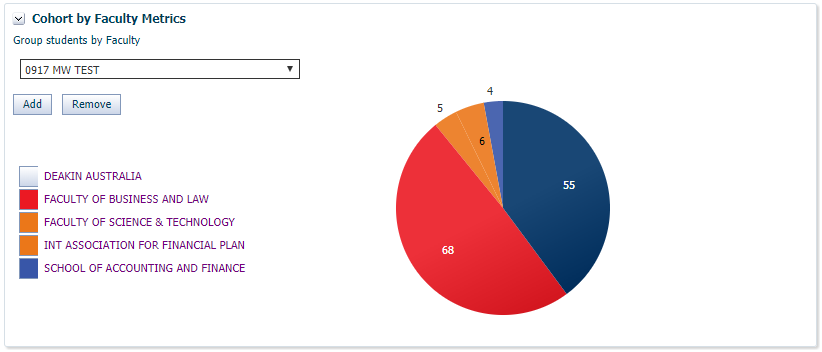
The numbers indicate the number of Research Candidates for that Faculty.
By default, the top 5 faculties with most students are displayed but users can add or remove a Faculty from the chart using controls within the panel.
Users can add a Faculty to the chart by selecting the Faculty name from the drop down and clicking on the Add button.
Users can remove an Organisational Unit in the chart by selecting the Faculty name and clicking on the Remove button.
Note that the drop down list in this panel displays the Descriptions
of any Organisational Units (ORG_UNIT. DESCRIPTION) that are owners of Research courses with at least one candidature. These are often Faculties within institutions.
At least one Faculty must be available for viewing at all times. Removing the last visible Faculty will reset the graph to display the default view. By default the graph displays the top 5 Faculties with largest cohorts of HDR students
Users are able to click individual sectors within the chart, or in the legend, to select a Faculty.
Once clicked the Candidature grid will appear (in RESW1100), containing research candidates in that Faculty.
This graph displays a Supervisor’s commitment during time period defined by the users.
A user can enter the ID for the supervisor and the period during which they would like to view the supervisor’s commitments, and then click on the Filter button.
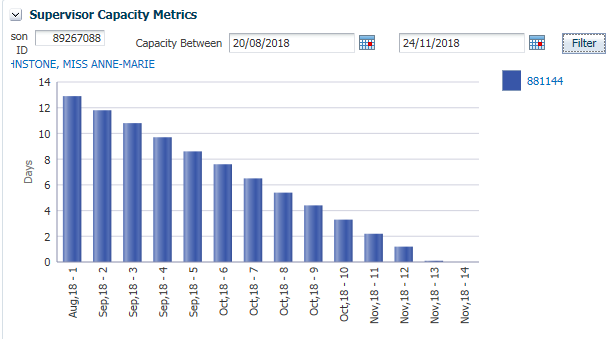
The chart above shows the results for a supervisor who is supervising one student during the defined period.
The labels on the horizontal axis refer to the Month, Year and week number within the defined period. e.g. Nov,18 - 1 refers to the first week of the period which is in November 2018.
The units on the the vertical axis are the Effective Full Time Days (EFTD) remaining for the student.
The legend gives the Person ID of the student. Click on the Person ID link to display the Candidature for that student in RESW1100.
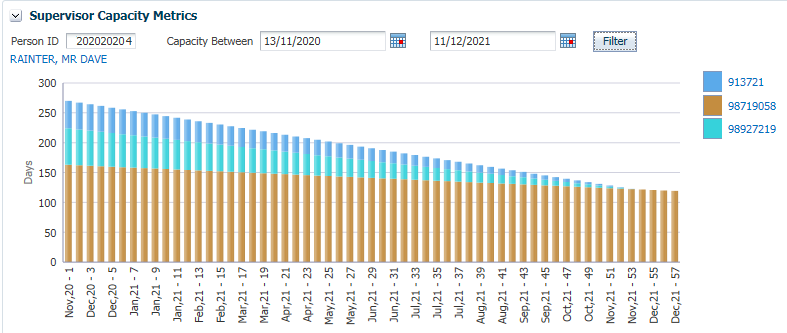
The chart above is for a supervisor that will be supervising three students during the period of interest.
In this case each column is sub-divided to show the relative EFTDs remaining for each student at that time.
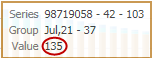
Hover the mouse over a coloured segment in a column to display the actual EFTD remaining for that student at that point of time.See below.
Further information about Research Students can be found in these Online Help pages:
Page last modified: 26 November, 2018 4:31 PM
History Information:
| Release Version | Project | Change to Document |
|---|---|---|
| 20.0.0.2 | 2350 - HDR Administrator | New page |