
| Top of FIN | Index | Table of Contents | Feedback | |
Calculation and Schedule Data can be stored in the database at more than one level, with the level at which it is stored determining the scope of a fee. Different forms and screens act as different 'gateways', each of which allows the entry and access of data at one of the level
As a very simple example, consider a computer Access Fee with the Fee Type COMP-ACC. This fee has been assigned to two categories: INTRNTL-UG and DOMESTC-UG. Assume that this fee is to be charged at a flat rate of $75 in the FEE-SEM1 Fee Period:
If the rate is entered using the Maintain Fee Types form (FINF2100), then it will apply to both the INTRNTL-UG and DOMESTC-UG Categories and therefore to students in both these categoriesIf the rate is entered using the Maintain Fee Categories form (FINF2800) with DOMESTC-UG selected, then that rate will only apply to students in the DOMESTC-UG Categor
If a schedule is set up using the Maintain Fee Types form (FINF2100), then students in both the INTRNTL-UG and DOMESTC-UG Categories will pay the fee at the same time
If a schedule is set up using the first screen of the Maintain Fee Categories form (FINF2800) with DOMESTC-UG selected, students pay the COMP-ACC charge at the same time as they pay other fees in the DOMESTC-UG Category
If a schedule is set up using the second screen of the Maintain Fee Categories form (FINF2800) with DOMESTC-UG selected, the COMP-ACC charge is paid at a time that applies only to this fee when in this category
To extrapolate from these examples, for calculation and Schedule Data:
| Data can apply to: | Use form: | Level abbreviation: |
| All occurrences of a Fee Type, irrespective of Category | FINF2100 | FTCI
level (Fee Type level) |
| All Fee Types in a particular Category (schedules only) | FINF2800
(1st screen) |
FCCI
level (Fee Category level) |
| A single Fee Type in a particular Category | FINF2800
(2nd screen) |
FCFL
level (Fee Liability level) |
The next section summarises which levels can be used for which data, and the override and other rules that apply.
It is expected that this summary will be most useful once you are reasonably familiar with the forms used in setting up Student Finance data.
| FTCI level | FCCI level | FCFL level | ||
| Schedules |  |
|
See Schedules notes below | |
| . | . | |
|
. |
| Charge Method |  |
. | |
Charge Method and rule must be at same level |
| Charge Method Apportionment | |
. | |
. |
| Payment Rank | |
. | |
. |
| Rule | |
. | |
. |
| Rate | |
. | |
See Calculation notes below |
| Element Ranges | |
. | |
See Element Ranges notes below |
| Define Trigger Type | |
. | . | See Institution Fee notes below |
| Use Triggers | . | . | |
Not applicable to INSTITUTN Trigger Category |
| Tax Exempt check box | |
. | . | Student Contribution Amounts and INSTITUTN Fees |
| . | (
) |
|
|
See Tax notes below |
| Tax rule | |
. | |
See Tax notes below |
Fee
data can exist at these levels simultaneously
Fee data can exist at either level, but not both
Schedule Notes
For fees with a COMSUPPORT (HECS) System Fee Type or an INSTITUTN System Fee Trigger Category, schedules must be at FTCI level. In these two cases, lack of a particular schedule at this level is taken to mean that the corresponding schedule conditions do not apply for these fees, even where they are included in a Category with a Schedule of the same kind at FCCI level.
Where a Schedule exists at FTCI level, a corresponding schedule cannot be created at FCFL level, and vice versa.
Where a Fee Type has a Schedule at FTCI level, this schedule overrides one at FCCI level for that Fee Type only.
A Fee Liability Schedule at FCFL level overrides a schedule at FCCI level for the corresponding Fee Type only.
Calculation Notes
Fees with either a COMSUPPORT (HECS) System Fee Type or an INSTITUTN System Fee Trigger Category must have calculation details defined at FTCI level. Charge rate and Element Ranges must be specified at the same level. As well as by level, rates can be further differentiated by:
Any combination of Course Code, Course Version, Location, Attendance Type, Attendance Mode, Cohort, Unit, Unit Version, Unit Location and Class. Where the rates are not mutually exclusive, an order of precedence must be set. These attributes are not applicable to Student Contribution Amount, and Course/Unit Code and Version Attributes are not applicable to institution fees
Government Student Status, and for options representing a Student Contribution Amount, by Discipline Band.
Element Ranges Notes
Element Ranges cannot be specified for a fee if:
The System Fee Type is COMSUPPORT (HECS), or
The Charge Method is FLATRAT
and can only be specified at the FTCI level for institution fees.
Institution Fee Notes
Fees with an INSTITUTN System Fee Trigger Category:
Do not have triggers (can use any Charge Method)
Must have all their details defined at FTCI level
Are levied only once, even if a student has more than one current Course Attempt.
Tax Notes
Fees are taxable unless the Tax Exempt check box is set (checked).
If a category (FCCI level) is set as Tax Exempt, all liabilities for the category (at FCFL level) must be Tax Exempt. But if a category is taxable, it can include component liabilities that are Tax Exempt.
For fees with a System Fee Type of COMSUPPORT (HECS) or an INSTITUTN System Fee Trigger Category, tax data is defined at FTCI level and cannot be overridden.
Student Contribution Amounts are exempt from tax, and the Tax Exempt check box defaults to set (checked)
Fees with an INSTITUTN System Fee Trigger Category can be taxable or Tax Exempt
For other than Student Contribution Amounts or institution fees:The value of the Tax Exempt check box at FCFL level overrides that at FTCI level for the same fee
The value of the check box at FCFL level defaults either:
To Tax Exempt, if the Fee Liability is in a Tax Exempt Category, OR
To the value of the check box at FTCI level (but this defaulted FCFL value can be changed)
If applicable, a Tax Rule can be set at either FTCI or FCFL level, but not at both for the same fee
Note: The rates discussed here do not include contract rates established with individual students in the Maintain Contract Fee Assessment Rates form (FINF2900). They do include contracts based on standard rates and established through Admissions (ADMF3660).
Rates for Fee Types are set up in the Define Fee Assessment Rates form (FINF2853), which can be accessed either from the Maintain Fee Types form (FINF2100) or from the Maintain Fee Categories form (FINF2800).
At either of these levels, multiple rates can be specified for a single Fee Type. Rates may be defined on various attributes or criteria.
The criteria available for a Fee Type depends on its System Fee Type, as shown in the table below. Note that if the sets of criteria recorded for a particular fee's rates do not cover all the options, a fee is not incurred for the options not covered. For example, in a multi campus institution, a rate may be defined only for Campus A and Campus B. Students studying at Campus C will not incur the fee
For Fees With OTHER System Fee Types
Select from these criteria:
For Fees With COMSUPPORT (HECS) System Fee Types
Select from these criteria:
For Fees With TUITION System Fee Types
Select from these criteria:
Certain combinations of criteria are mutually exclusive - for example, the values 'full time' and 'part time' for two rates set up using only the Attendance Type as a criterion are mutually exclusive. But some combinations can be ambiguous, with the potential for different rates to apply in the assessment of a single student Fee Liability.In these circumstances, an Order of Precedence must be given to each criteria combination applied to a Fee Liability.
Using
Order of Precedence
It may be
desirable to have one rate covering the majority of courses studied at any location,
and for any Attendance Type or Mode, and then specify rates with particular
criteria for a limited number of exceptions. For example, one rate is set for
full-time students in Course AA111 at Campus A, a second for on-campus students
in Course BB222, version 2 at Campus B, and a third for all other options. In
this case, it is important to set up the exceptions to take precedence over
the general case, and this would be achieved as follows:
| Order of Precedence |
Course Code |
Version Number |
Location Code |
Attendance Type |
Attendance Mode |
Rate |
| 1 | AA111 | - | Campus A | F/T | - | Rate X |
| 2 | BB222 | 2 | Campus B | - | N | Rate Y |
| 3 | - | - | - | - | - | Rate Z |
Where a criterion field is left blank in the Define Fee Assessment Rates form, FINF2853, this indicates that the rate applies for any value of that criterion. To ensure that Unit Assessment Rates are applied over Course Rates, Unit Assessment Rates must have a higher order of precedence than Course Rates.
Government
Classifications
A Government
Student Status can be a single criterion, or may be used in conjunction with
a Government Discipline Band. Student Contribution Amount, which have a Government
Student Status of 201, 202 or 203, are typically set up using 12 sets of criteria
as shown below. This covers both rates for students not liable for differential
Student Contribution Amount, as well as a rate per band for those students to
whom differential Contribution Amount applies.
Govt Student Status
| Govt Discipline Bands | Sample
$ value of Charge Rate |
||
| 201 - Deferred all or part of student contribution through HECS-HELP | Rate A | 2520.00 | |
| . | 1 | Rate B | 3356.00 |
| . | 2 | Rate C | 4779.00 |
| . | 3 | Rate D | 5593.00 |
| 202 - Paid the full student contribution upfront with the HECS-HELP discount | . | Rate A | 2520.00 |
| . | 1 | Rate B | 3356.00 |
| . | 2 | Rate C | 4779.00 |
| . | 3 | Rate D | 5593.00 |
| 203 - Paid in full student contribution upfront without the HECS-HELP discount | . | Rate A | 2520.00 |
| . | 1 | Rate B | 3356.00 |
| . | 2 | Rate C | 4779.00 |
| . | 3 | Rate D | 5593.00 |
Derived Versus Nominated Course Attributes
In the case of some enrolled students, the values recorded against their student Course Attempts for Location, Attendance Type and Attendance Mode may be at variance with the values that would be returned by examining the composite effect of their individual Unit Enrolments for the course. For example, a student Course Attempt may have an off campus Attendance Mode recorded, but the student may be studying a majority of their units on campus.In the case of fee assessment, it is therefore important to understand whether nominated values (recorded against the Course Attempt) or derived values (arrived at through an examination of units studied) are being used in specific situations.
Course Fee Triggers
Course Fee Triggers can be created (in FINF2222) to match a Course Attempt on any or all of the three attributes; Location, Attendance Type and Attendance Mode. These triggers are matched to nominated Course Attempt attributes, and where a match is made, the student is liable for the fee thus triggered.
Rates (Including Contract Rates)
Note that Course, Unit and Cohort attributes for rates do not apply to Student Contribution Amount, which can be differentiated only by Student Status and Discipline Bands.
System Fee Trigger Categories (Other Than INSTITUTN)
With a System Fee Trigger Category of COURSE, UNIT, UNITSET, COMPOSITE the fee relates to a single Course Attempt.A rate with location specified is matched against the nominated location of the student Course Attempt.A rate with an Attendance Mode and/or Attendance Type specified is matched against a derived Attendance Type or mode.Derived values are determined in the following way:
Attendance Mode
For a student Course Attempt to match a rate for an institution defined value equivalent to 'on campus' attendance, all units must be on campus For a student Course Attempt to match a rate for an institution defined value equivalent to 'off campus' attendance, all units must be off campus Otherwise, a rate for a value equivalent to 'multi-modal' attendance applies
Attendance Type
The derivation process considers only Unit Attempts in Teaching Periods related to the Load Calendar that is linked to the Fee Period. Where the Load Calendar is an aggregate Load Calendar, EFTSU is calculated for each of its subordinate Load Calendars and then summed. For a student Course Attempt to match a rate for an institution defined value equivalent to 'full time', the sum of the EFTSU values for each unit must be within the range specified by the institution as a full time load for that Load Calendar (in Maintain Attendance Types, CRSF1170) For a student Course Attempt to match a rate for a value equivalent to 'part time', the sum of the EFTSU values for each unit must be within the range specified as a part time load for that Load Calendar (in Maintain Attendance Types, CRSF1170)
Fee Types with System Fee Trigger Categories of INSTITUTN
Where a
student is enrolled in more than one course, an assessment for an institution-wide
fee must take all Course Attempts liable for the fee into consideration when
determining the rate.When calculating institution fees, fee assessment considers:Total Load for Fee Period - Sum of all the load incurred by all course attempts liable for the FTCI in a given fee period. For HE courses this is the EFTSL value and for VET courses this is the Contact HoursMajor Course – Course contributing the most load to calculation of Total Load for Fee Period under consideration.
If only HE courses are assessed then the course with the highest load (EFTSL) will be selected.
If only VET courses are assessed then the course with the highest load (contact hours) will be selected.
If HE and VET courses are assessed then the HE course with the highest load will be selected.
Where more than one course has the same load, the course with the earliest commencement date is considered the major course.
In circumstances where the commencement dates are are also the same, then the one whose Course Offering Option has the lowest COO_ID value will be considered to be the major course. Note: - COO_ID is unique to a Course Offering Option and is assigned when an offering is created.Major Course Location – Location of the course determined to be the Major Course as above.Major Correspondence Category - Correspondence of the Major Course. Derived Attendance Mode (ON/OFF) – As determined for courses contributing to Total Load for Fee Period
For a student Course Attempt to match a rate for an institution defined value equivalent to 'ON campus' attendance, all units must be ON campus - the derived value is 1
For a student Course Attempt to match a rate for an institution defined value equivalent to 'OFF campus' attendance, all units must be OFF campus - the derived value is 2
Otherwise, a rate for a value equivalent to 'multi-modal' attendance applies - the derived value is 3Derived Attendance Type (PT/FT) – Total load for Fee Period calculation used to determine the Attendance Type for the fee calendar (see above "Rates (including Contract Rates)' for more info)
A credit balance is held for a person or an organisation. It is based on all fees for which a student or sponsor has ever been liable, irrespective of Fee Periods, courses or (for sponsors) the number of students involved. For students, the Student Finance Subsystem distinguishes between unmatched payments and System Credit.
Unmatched PaymentsThis amount is the total of received payments that have not yet been matched to invoiced debt. Creation of invoices, receipt of payments and matching of payments to debt is handled by processes providing an interface between Callista and an External Financial System. Payments are not recorded as payment transactions against specific fees within core Callista until this matching has been done. If the unmatched payments total is greater than the System Credit, the difference is not available for refund.Unmatched payments can be seen in FINF9130.
System CreditSystem Credit for a student is calculated in this way: For all unfinalised Fee Periods, in core Callista the total of debt transactions is subtracted from the total of payment transactions (payment transactions represent payment already matched to debt, and include discounts awarded) Effectively, this step takes account of newly assessed debt transactionsAll unmatched payments are addedRefunds that have already been approved are subtractedA positive result is recorded as the student's System Credit, otherwise zero is shownDeferred Student Contribution Amount. A debt is not subtracted if the Student Status is deferred as at the Census Date.Tax. Calculation of System Credit includes tax debts and payments.System Credit can be seen in FINF6420 (Maintain Refunds) and in FINF9130 (System Credit Inquiry). A student's System Credit is available for refund.
Notes On Processing System CreditThe System Credit is reduced to take account of a student's increased debt (reflecting an increase in study load) as soon as an assessment or reassessment is made in a Fee Period (that is, immediately after running FINJ3500 or FINJ3001). At this point, invoices have not been created for the newly assessed debt. For decreased debt (a reduction in study load in a given Fee Period), the System Credit does not always show increased credit immediately a reassessment is run in the period. The System Credit will be increased immediately if the student reduces their study load, and hence reduces their debt for a particular fee, before a payment has been matched to the debt incurred as a result of the prior assessment of that fee. This would typically be where a student reduces their load before making a payment. Alternatively, they may have paid, but then reduce their load before their payment details have been transferred to the Student Finance SubsystemHowever, when a student reduces their study load after payment has already been matched to the debt incurred for their prior assessment, the increased System Credit is not available until interface processing to an External Financial System has occurred. This is to prevent the possibility of 1) refunding to a student an amount actually paid by a sponsor, or 2) refunding based on the discount which was available on the prior assessment rather than the reduced assessment.
Credit ImplicationsStatement of AccountBoth System Credit and unmatched payments are recorded in the Statement of Account extract. If desired, when a student with credit increases their study load, their statement can show both credit still available for refund (if any) and the portion expected to offset the newly assessed debt, irrespective of when statements are produced in the fee processing and interface cycle. Typically, the available credit will have accrued from overpayment in an earlier Fee Period.
Sponsor CreditStudents, not sponsors, are assessed for debt. Therefore credit adjustments cannot be made for sponsors immediately an assessment is reduced. For sponsors, the credit amount is only shown as available (in the Maintain Refunds form, FINF6420) after the new assessment has been processed through the interface to an External Financial System.
A student's Student Status for a Course Attempt is recorded and maintained in ENRF3110. Normally each change in option is recorded as a new record. In this way, a history is built up of the Student Status applying to a student's Course Attempt during any particular period. However, for fee processing and statistical purposes, the option recorded as current at the Census Date is the significant option for a Fee Period. The record for this option may be open-ended.The field in which the Student Status Snapshot is retrieved is called the Reported Student Status. See 'Elected Student Status' at the end of this section for the different definitions between the two.
Using the Student Status The following fee processes access and use the student's Student Status (and the Differential Student Contribution Amount (HECS) check box where relevant) which is current as at the Census Date :
Student
Status Codes
For a full list of government student statuses (E490) refer to the TCSI Support website - https://www.tcsisupport.gov.au/.
Coding Notes
Code 240 “Received
loans through OS-HELP” is not to be used on the Load/Liability File. This
code is only to be used in the HELP-DUE File in respect of students who are
reported on the OS-HELP File.A domestic postgraduate
research student who is not RTS supported may be charged tuition fees or awarded
an Exemption scholarship under code 270. If regional adjustment package has
been used to support such students, these students should be included under
code 270. A domestic postgraduate
research student charged tuition fees may receive FEE-HELP assistance. FOR ATO purposes only, Element
380 (Liability status codes) will be concorded to Element 490 (Student status):Element 380 = 80 (E490
= 110, 201)Element 380 = 81 (E490
= 220, 230, 231, 232, 233)Element 380 = 82 (E490
= 240)Codes 280 and 281 are not recorded in ENRF3110. These are used by the SA-HELP file for Government Statistics reporting.
Recording
the Census Date
To implement
the processing described above: A single
Census Date should be recorded against each Fee Period (including those spanning
more than one conventional Teaching Semester). This is documented as a part
of Calendar Setup in the Specialist OverviewThe Census
Date should be used as the Effective Date when running FINJ6240,
Process Student Status.
Automatic
Option Change for Student Contribution Amount
Running
the Process Student Status job, FINJ6240, can change
a student's Status snapshot for a Course Attempt so that the snapshot recorded
at the Effective Date reflects their actual payment history for the Fee Period
rather than the option nominated on their Student Status Declaration Form.
Example
FINJ6240
is run with an Effective Date of 31/3/2003. The student is recorded as Up-front
(11), but has made no payment, or insufficient payment, and is therefore switched
to Deferred (10).
Elected Student Status
For each Student Course of Study an Elected Student Status is captured against
each individual Unit Attempt. To elect a Student Status, the student must
complete a Commonwealth Assistance Form. This form is used by any student that
has been granted a Commonwealth Supported Place and/or is electing to utilise
FEE-HELP. On this form the student must elect a payment option, and if necessary,
a tax file number.The Elected Student Status is displayed consistently throughout all the Student
Finance Inquiry forms. This allows users to quickly determine the student's
Elected Student Status when analysing the student's financial records. Do not
confuse Elected Student Status with Student Status. Elected Student Status
does not show Student Status Snapshot.
Government Loan Schemes FEE-HELP
Overview
FEE-HELP enables students to obtain a loan from
the Commonwealth Government to pay all or part of their tuition fees. The Commonwealth
Government pays the amount of the loan directly to the student's institution
and the student repays their loan through the taxation system once their income
reaches the minimum threshold for compulsory repayment.FEE-HELP
differs from Student Contribution Amount in that, at the Postgraduate level,
Government funded higher education institutions offer some courses to students
under Commonwealth Supported Places. Students enrolled in a Student Contribution
Amount course are required to make a contribution toward the cost of their course
and the Commonwealth pays the remainder. The Commonwealth sets the amount students
are required to contribute and most students can choose how they pay that contribution,
including deferring the entire amount.Institutions
also offer fee-paying Postgraduate course to students. Unlike Commonwealth Supported
Student courses, institutions set the Tuition Fee for these courses and students
are required to pay the full amount. For the student, a FEE-HELP loan works
in the same way as the Student Contribution Amount deferred payment arrangements,
however Callista treats the FEE-HELP loan using Loan Scheme functionality.
HECS-HELP Overview
HECS-HELP is a Commonwealth Government loan scheme available to eligible students enrolled in Commonwealth supported places. This loan scheme assists students with their student contribution payments The Australian Government pays the loan amount directly to the institution on the student's behalf and a HECS-HELP debt is then recorded with the Tax Office against the student's Tax File Number. The debt is then to be repaid once the student's repayment income is above the minimum threshold.
To be eligible for HECS-HELP, the student must complete, sign and submit a Request for Commonwealth support and HECS-HELP form on or before the census date.
OS-HELP Overview
OS-HELP is a loan available to eligible undergraduate students enrolled in a Commonwealth supported place who want to undertake some of their study overseas. OS-HELP can be used for a range of expenses such as airfares, accommodation, and other travel or study expenses. Students may receive one loan per six-month study period and can access a total of two OS-HELP loans over their lifetime.
Implementing
Government Loan Schemes
Institutions
can receive payment for Tuition Fees via a Loan Scheme. A Loan Scheme has a
Loan Scheme Calendar Instance. This is the logical Finance Customer of the Loan
Scheme for all the Calendar Instances covered by FEE-HELP.(e.g.
FEE-HELP could have a FEE-HELP-12-1 finance customer for this Semester)
The first three methods allow the full revenue to be sent to finance via the invoice process and via the Disbursement process.The Draw-Down process inserts a transaction into the Fee Assessment table to record the amount of the loan.The calculation of COFI invoices operates differently, before and after the Draw-Down job.This process does NOT change the Student Status for any students.A snapshot is created by FINJ6240.
FINJ6200
– Commonwealth Assistance Notice (CAN)
Student Statuses,
and student payment activities determine the various processes that are required
to take place before FINJ6200 is run. The following
information is a discussion of the possible scenarios that should be considered
before FINJ6200 is run and CAN notices are sent.
This discussion is limited, and should be treated as an attempt to shed light
on a complex area of functionality.
In Callista, a Census Date is defined against the Teaching Calendar that the
Unit is associated with. At a designated date after the commencement date of
the unit, information on all students enrolled in the unit will be sent off
to the government (FINJ6200).
Under normal circumstances,
and before a Census Date, a Fee Assessment (FINJ3500)
is made and a students Payment Schedule (FINJ6111)
is run.
COFI Invoices (INTJ0021)
and Transfer External Finance System Payments to Callista (INTJ0022)
will also happen.
This processing cycle continuously repeats itself during a
fee period. For Census Date, a Loan
Draw Down (FINJ6240) is carried out. In a perfect
world, (students paid when they said they would pay or not pay when they said
they would not pay), there would be no requirement to alter student finance
data (Fee Assessment, Person Payment Schedules and COFI), and FINJ6200
would extract data.Unfortunately, it is not a perfect
world, nor do students stay with their initial choices.
If there were Pre-Submission
Date administration changes, such as student enrolments that effect Load in
the Teaching Calendar, then Fee Assessment (FINJ3500)
would need to be run, then the Persons Payment Schedule (FINJ6111),
along with COFI processing, before running the Commonwealth Assistance Notice
(FINJ6200).
Let’s look at opposites.
What happens to the process when students say they will pay, but don’t?
When the Loan Draw Down (FINJ6240) runs the Student
Status is overridden and a student Status snapshot created (Student Course Attempt
– ENRF3110). They now get a Fee Assessment
Loan record. Subsequently, the Person Payment Schedule (FINJ6111)
needs to be run to allow this change to be made. This reflects that a student
debt is now incurred by the loan scheme. Now run FINJ6200.
What happens when students
say they are not going to pay, but in fact end up paying. If the Higher Education
Provider (HEP) has previously recorded the student as not paying, then Person
Payment Schedules will show the loan scheme as responsible for the debt. COFI
invoices will exist for the loan scheme. The students payment will exist as
an unmatched system credit. Running a System Credits Report (INTR0110)
will identify this student. There are two options the HEP can carry out. Do
nothing and allow the student’s money to stay in credit, or change the
student status. If the HEP changes the student status, the Fee Assessment (FINJ3500)
will need to be run, then the Persons Payment Schedule (FINJ6111),
followed by the COFI Invoices (INTJ0021).
Subsequently, run the Loan Draw Down (FINJ6240).
Only now can the Commonwealth Assistance Notice (FINJ6200)
be run and produce timely data. If FINJ6200
is run without the previous considerations, there is a good chance that the
data will be misleading.
| Student Action | Time | SMS Response |
| Starts a unit | Before Census Date | FINJ3500, FINJ6111, INTJ0021 & INTJ0022 |
| No changes | Census Date | FINJ6240 & FINJ6200 |
| Administration changes | Pre- Submission Date | FINJ3500, FINJ6111 & FINJ6200 |
| Say paying, but don’t | Census Date | FINJ6240, ENRF3110, FINJ6111 & FINJ6200 |
| Say not paying, but do (Option 1) | Census Date (HEP - No action) | INTR0110, FINJ6240 & FINJ6200 |
| Say not paying, but do (Option 2) | Census Date (HEP changes Student Status) | INTR0110, FINJ3500, FINJ6111, INTJ0021, FINJ6240 & FINJ6200 |
Fee Disbursement - Formula Examples
ASSESSMENT
Formula Type
Note:
In order to view the tables below correctly, please read this documentation
with the screen maximised.
Course
Specific Fees
System Fee Trigger Category = COURSE, UNIT, UNITSET, COMPOSITE
For any Course Specific Fee, Assessment and Payment is on a student Course Attempt basis. Students with a liability for the same fee in more than one course in a Fee Period (for example, with a liability for a Fee Type TUITION in two courses in FEE-SEM2) are assessed for each course independently. They therefore have independent records for assessment and payment relating to each Course Attempt, with Disbursement also operating independently on the basis of each attempt.
For further information on Alternative Disbursement, see the heading 'Special Note on Alternative Disbursement' in FININTR3 - Understanding Student Finance.
For alternative Formula Types, look for the 'Lamp Text' at the bottom of FINF7510 - Maintain Fee Type Disbursement Formulae.
| Fixed Amount Disbursements (Course Fees) | |
| Example based on a fixed amount of $10 for each formula | Total amount to be disbursed |
| PERCOURSE | $10 * 1 (where the student has at least one unit incurring load) |
| PERUNIT | $10 * number of load incurring units studied by student in the course over the Fee Period. |
| CRPOINT | $10 * total Credit Point value of load-incurring units studied |
| EFTSU | $10 * total EFTSU value of units studied |
| EFTSL | $10 * total EFTSL value of units studied |
| * = Multiplied by | . |
For further information on EFTSL, see EFTSL - Equivalent Full Time Student Load (GSFF_EFTSU).
The following table gives suggested combinations of formula components for a Course Fee. Note that the allocation method STUDENT is not relevant for any Course Fee because Disbursement is based on a liability for a single Course Attempt.
| Suggested Formulas (Course Fees) | |||
| Disbursement Method | Disbursement Fixed or % |
Allocation Method | Notes |
| DIRECT - total disbursed amount goes directly to a single specified Organisational Unit | FIXED | PERCOURSE PERUNIT CRPOINT EFTSU |
See 'Fixed Amount Disbursements' table above |
| % | PERCOURSE | Other Allocation Methods are redundant because there is only one recipient of the disbursed amount | |
| COURSEOWN - total amount goes to the owner(s) of the relevant course | FIXED | PERCOURSE PERUNIT CRPOINT EFTSU |
See 'Fixed Amount Disbursements' table above |
| % | PERCOURSE | Other Allocation Methods are inefficient because Disbursement is to owner(s) of a single course, irrespective of Unit Teaching Responsibility or CRPOINT/EFTSU breakdown | |
| UNITTEACH - amount is split across relevant units and goes to departments with teaching responsibility for those units | FIXED | PERCOURSE PERUNIT CRPOINT EFTSU |
See 'Fixed Amount Disbursements' table above |
| % | PERUNIT CRPOINT EFTSU |
PERCOURSE is redundant - it achieves the same result as PERUNIT because the split is always across units | |
Example Scenario
| Student | Kim
Lee (student number 9537754) Enrolled in course M300, studying three units: MA001, MA002, MA003 Assessed debt for TUITION Fee Type for course M300 in Fee Period FEE-SEM2, 1999 = $150 |
| Disbursement Situation |
There
is only one course owner For each unit, teaching responsibility rests with one department |
| Course Details |
Course M300 is 'owned' by Faculty of Business |
Unit Details
| Unit Code | Credit Points | EFTSU |
Teaching Responsibility |
| MA001 | 2 |
0.25 | Department of Accounting |
| MA002 | 1 | 0.125 | Department of Economics |
| MA003 | 1 | 0.125 | Department of Economics |
Disbursement Formula Outcomes
The outcomes below are based on the above scenario. Read each line as a single formula in isolation. These formulas do not constitute a set, but for Percentage Disbursement are based in each case on a gross amount - the assessed debt of $150
Disbursement of Course Fees is always based on an assessment or payment for a single student Course Attempt.
| Formula Each line is a single formula % is based on gross $150 |
Total to be Disbursed ($) |
Allocated Amount |
Recipient | ||
| DIRECT | FIXED - $10 | PERCOURSE PERUNIT CRPOINT EFTSU |
10.00 30.00 40.00 5.00 |
10.00 30.00 40.00 5.00 |
Single nominated account |
| % - 10% of $150 | PERCOURSE | 15.00 | 15.00 | Single nominated account | |
| COURSEOWN | FIXED - $10 | PERCOURSE
PERUNIT CRPOINT EFTSU |
10.00 30.00 40.00 5.00 |
10.00 30.00 40.00 5.00 |
Faculty of Business |
| % - 10% of $150 | PERCOURSE | 15.00 | 15.00 | Faculty of Business |
|
| UNITTEACH | FIXED - $10 | PERCOURSE |
10.00* |
3.33 6.66 |
Dept
of Accounting |
| PERUNIT | 30.00 | 10.00 20.00 |
Dept
of Accounting Dept of Economics |
||
| CRPOINT | 40.00 | 20.00 20.00 |
Dept
of Accounting Dept of Economics |
||
| EFTSU | 5.00 | 2.50 2.50 |
Dept
of Accounting Dept of Economics |
||
| % - 10% of $150 | PERUNIT | 15.00 | 5.00 10.00 |
Dept
of Accounting |
|
| CRPOINT | 15.00 | 7.50 7.50 |
Dept
of Accounting Dept of Economics |
||
| EFTSU | 15.00 | 7.50 7.50 |
Dept
of Accounting Dept of Economics |
||
| * Disbursed amounts may not sum exactly to total amount to be disbursed | |||||
The table above illustrates suggested formulas for the scenario. Although other combinations of the formula components described (Disbursement Method, Fixed or % Disbursement, Allocation Method) can be used, they are less efficient means of achieving the same results, and may result in slightly different totals because of rounding on allocation amounts at a lower level.Generally there will be a mathematical equivalence between Credit Points and EFTSU, and in this situation the two will be interchangeable for percentage disbursement. However if overrides are used for EFTSU or Credit Points (see the documentation about enrolling in Unit Attempts) and do not maintain the concurrence between the two, using EFTSU or CRPOINT in a formula will produce different results.
Institution-Wide
Fees
System Fee
Trigger Category = INSTITUTN
| Fixed Amount Disbursements | |
| Example based on a fixed amount of $10 for each formula | Total amount to be disbursed |
| STUDENT | $10 * 1 |
| PERCOURSE | $10 * number of courses studied by student in the Fee Period, liable for the fee |
| PERUNIT | $10 * number of units with load studied by student over the Fee Period for all liable courses |
| CRPOINT | $10 * total Credit Point value of units studied and liable for the fee |
| EFTSU | $10 * total EFTSU value of units studied and liable for the fee |
| * = Multiplied by | |
| Note: In all cases, load must be incurred according to Charge Method Apportionment Calendars. | |
| Suggested Formulas (Course Fees) | |||
| Disbursement Method | Disbursement Fixed or % |
Allocation Method | Notes |
| DIRECT - total disbursed amount goes directly to a single specified Organisational Unit | FIXED | STUDENT PERCOURSE PERUNIT CRPOINT EFTSU |
See 'Fixed Amount Disbursements' table above. |
| % | STUDENT | Other allocation methods are redundant because there is only one recipient of the disbursed amount. | |
| COURSEOWN - amount is split between courses studied when the institution fee was incurred | FIXED | STUDENT PERCOURSE PERUNIT CRPOINT EFTSU |
See 'Fixed Amount Disbursements' table above. |
| % | PERCOURSE PERUNIT CRPOINT EFTSU |
STUDENT is redundant because the result is the same as for PERCOURSE. | |
| UNITTEACH - amount is split across relevant units for courses and goes to departments with teaching responsibility for those units | FIXED | STUDENT PERCOURSE PERUNIT CRPOINT EFTSU |
See 'Fixed Amount Disbursements' table above. |
| % | STUDENT PERCOURSE PERUNIT CRPOINT EFTSU |
STUDENT and PERUNIT are interchangeable - the amount is split equally between all units, irrespective of course. For PERCOURSE, the amount is split equally between courses, and then equally across units within courses. |
|
Promotion Discounts
Promotion Discounts offer reduced tuition fees for targeted groups or individuals.
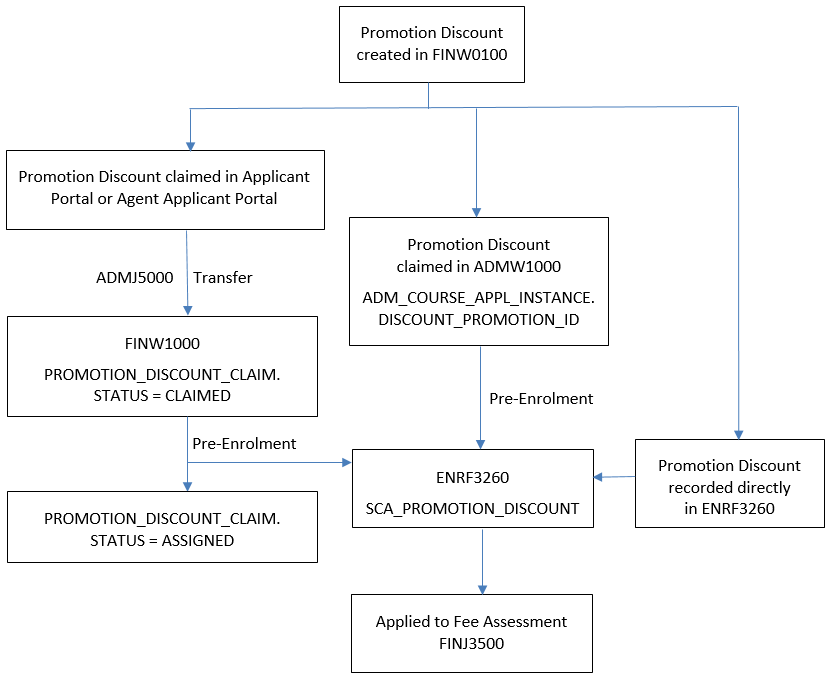
Promotion discounts are created and managed in FINW0100 and they can have a range of associated conditions, such as validity dates and course offering options.
Individual promotion discounts provide the ability to offer a discount to specific people whilst the Agency category provides the ability to offer discounts to specific agencies. Generic Promotion Discounts can be selected by any applicant that has a knowledge of the Promo ID and whose citizenship, course selection, etc. satisfy the criteria defined for the Promotion Discount in FINW0100.
Applicants or their agents can claim the promotion discount by recording the Promo ID against a Course Preference. When the application is saved, a record with a status of CLAIMED is created in the PROMOTION_DISCOUNT_CLAIM table. This can be viewed in FINW1000 and, before pre-enrolment, the status of this claim can be changed to REVOKED on this page.
In ADMW1000, Admission Administrators can claim a promotion discount for an applicant. This inserts a Discount Promotion value in the ADM_COURSE_APPL_INSTANCE table for the applicant.
During pre-enrolment, if a PROMO ID is recorded for the student in ADMW1000 then this discount will be applied and a corresponding SCA Promotion Discount record will be created in the SCA_PROMOTION_DISCOUNT table. This can be viewed in ENRF3260. If there is no Promo ID recorded for an applicant in ADMW1000, then a discount claimed via Applicant or Agent Applicant Portal will have its status changed to APPLIED and a corresponding SCA Promotion Discount record will be created.
| Release Version | Project | Change to Document |
| 24.1, 25.0 & 25.1 | 2618 - Remove Upfront Discount | Included link to TCSI for student statuses. |
| 22.0.0.0 | 2360 - Software Decommissioning | Removed references to FINJ6190. |
| 20.0.0.2 | 2330 - Discounts at Offer | Updated information for Promotion Discounts. |
| 19.1.0.2 | 2229 & 2233 - Promotion Discounts | Added information for Promotion Discounts. |
| 13.0.0.3, 14.0.0.2, 15.0 | 1834 SA-HELP Fees | Added information for SA-HELP fees and removed references to old fee processing |
| 11.0.0.2 | 1408 - PC98 | Additions to Derived Versus Nominated Course Attributes section |
| 10.1.0.0.0.0 | 1346 - Extended Fee Functionality | Added History Information |
| 8.1.0.0.0.0 | 1192 - Compliance SSPPU | Added 'Elected Student Status' and description |
| 8.0.0.0.0.0 | C16760 | Add, For further information on Alternative Disbursement, see the heading 'Special Note on Alternative Disbursement' in FININTR3 - Understanding Student Finance. Add EFTSL to Fixed Amount Disbursement (Course Fees) table with note referencing EFTSU at gsff_eftsu.htm |
| 7.1.0.0.0.0 | C14583 | Changed references to Inquiry directory for Finf files |
| 7.1.0.0.0.0 | C14440 | Add Special Note to Government section |