
| Top of Proposals | Index | Table of Contents | Feedback | |
Proposal Items are the separate data items that make up a Proposal.
e.g. A Course proposal might contain items of Attendance Mode, Attendance Type, etc.
Use this page to create and maintain the Proposal Items to be included in a Proposal Type.
Example.
There is a system proposal item defined for 'Course Attendance Type' which corresponds to the Course Attendance Type in Callista CRS. This system data is set in an appropriate context. i.e. As part of a course offering option.
The Proposal Item is created in PAAW0300 and mapped to the appropriate system proposal item (ATTTYPE).
It inherits the System Proposal Type (COURSE) and System Element Code (COO) from the system value.
This Proposal Item can then be selected as part of an element (mapped to system element code COO) in a proposal type (e.g. NEW COURSE) in PAAW0200.
See the Proposals System Data pages for more details:
Proposals Unit System Data
Proposals Unit Set System Data
Proposals
Course System Data
This page may be reached directly from the menu.
A list of Proposal Items is displayed on entry to this page. This list can be searched using the initial fields displayed or the Additional Search fields available. See Working with Lists for general information about lists.
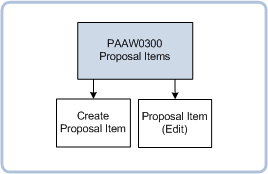
To create a new Proposal Item, click on the New button to open a blank Proposal Item page.
Record details for the new Record and click the Create button to create it. If you wish to continue creating new Proposal Items, click on the Create & New button.
To edit an existing Proposal Item record click on the link formed by the Proposal Item Code to open a page in which that record can be edited.
Make changes to the record and click on the Save button to commit the changes.
To delete a Proposal Item select that record and click on the Delete link.
These values are used to map Proposal Items to corresponding System Proposal Items. These are described in Proposals Unit System Data, Proposals Unit Set System Data and Proposals Course System Data.
| Field: | Description: |
| Proposal Item Code: | The local name for this Item which will be used instead of the system data name. PROPOSAL_ITEM.PROPOSAL_ITEM_CD |
| Description: | Description of this Item - may contain up to 60 characters. PROPOSAL_ITEM.DESCRIPTION |
| System Proposal Item Code: | Use a look up to select the System Proposal Item. A Proposal Item that is mapped to a system value will be subject to the validations of that system value. A system value (other than USER DEF) is the representation of the fields and records that form the Course Structure and Planning tables for a UNIT. PROPOSAL_ITEM.S_PROPOSAL_ITEM_CD |
| Closed: | Select this check box to close this Proposal Item. It will then no longer be available for inclusion in Proposal Types. PROPOSAL_ITEM.CLOSED_IND |
| Field: | Description: |
| Amendment Value: | This value gives a measure of the significance of an item. It may be used to derive the total amendment value for a proposal. If the Proposal Type (see PAAW0200) does not have a Review Category defined, then the aggregate value of its items is used to allocate the appropriate Review Category. Review Categories (PAAW0500) have an amendment range, the range that the aggregate value falls in will be the review category used. PROPOSAL_ITEM.REVIEW_CAT_AMENDMENT_VALUE |
| System Field Label: | Default Prompt for this System Proposal Item. S_PROPOSAL_ITEM.PROMPT |
| Override Field Label: | The prompt that will be displayed for this item in a proposal. If blank then the System Field Label will be displayed. Note: Some proposal pages will automatically insert a colon after the field label. For this reason the Override Field Label should not end with a colon. PROPOSAL_ITEM.OVERRIDE_PROMPT |
| Field Type: | Defines how the data will be collected. Examples of Field Types may be: check list, pop list, Radio Button, Text Field and FIND. Use the poplist to select the type of input allowed in the field. Enabled if associated system proposal item allows overrides else disabled. For concatenated fields, other than Unit Code, Unit Set Code or Course Code, the POPLIST option must be selected here. (Concatenated fields have an S_CONCAT_TYPE value defined for their System Proposal Item). PROPOSAL_ITEM.S_INPUT_FIELD_TYPE |
| Display Field Description: | If this check box is selected, then when the item appears in a proposal (in PAAW1100), then a description will be displayed for the selected value of the item. This may be the 'description' defined by a system-defined query for the item (from S_PROPOSAL_ITEM) or it may be a description derived by the override query defined in the Display SQL Statement below. If an SQL statement has been recorded in the field below to override the system value then a 'Display Description SQL has been overridden' lamp displays. This check box cannot be set if the associated system proposal item has data type of CLOB. PROPOSAL_ITEM.DISPLAY_DESCRIPTION_IND |
| Display SQL Statement | Where the Display Field Description check box is selected above, then the DISPLAY_DESCRIPTION_SQL query defined for the corresponding system proposal item will be displayed by default (where one exists). An alternative SQL query may be recorded here to override the system defined query. If an override SQL statement has been recorded here then a 'Display Description SQL has been overridden' lamp displays. Click on Test SQL to validate the SQL statement. A 'Valid' or 'Invalid' lamp displays. PROPOSAL_ITEM.OVRD_DISPLAY_DESCRIPTION_SQL |
This section of the page is dynamic. The field type details are determined by the Field Type selected above and the Allowable Values option selected here.
| Field: | Description: |
| Field Length: | Maximum number of characters which can be recorded for this item. Shows a value taken from System Proposal Item. Disabled if not allowed to override. PROPOSAL_ITEM.OVERRIDE_FIELD_LENGTH |
| Rich Text: | When selected, a rich text editor is enabled for the field allowing the application of formatting to the text (e.g. bold, italics). PROPOSAL_ITEM.RICH_TEXT_IND |
| Allowable Value: | Select the radio button for 'Any value', 'Defined by SQL Statement' or "Custom set'. The selection here will determine what fields are displayed below. e.g. If 'Defined by SQL Statement' is selected then the 'Values SQL Statement' field (see below) will display. PROPOSAL_ITEM_ALWBL_VALUE.VALUE |
| Values SQL Statement | In this text box record the SQL statement which defines the set of allowable values. This SQL statement allows a context to be passed from the proposal instance element in which the item has been used. For this to occur, the SQL must be defined with a variable. This may be - The variable works as follows - If "pie_sequence_number" is used, the context is passed in the form of the current proposal instance element sequence number. The sequence number is used in the item definition to alter the allowable values that are available. i.e. That text will be searched for in the allowable values SQL statement. Any time ‘:pie_sequence_number’ is found it will be substituted with the sequence number from the current proposal instance element. For further details relating to how these are used, refer to the Callista technical document - td_proposals. |
| Default Value: | The value displayed in this field by default. PROPOSAL_ITEM.DEFAULT_VALUE |
| System Find Type | Use the look up to select the System Find Type that will be required for this field. This find type will be available for the Proposal item as a pop up. e.g. Find and select Course PROPOSAL_ITEM.S_FIND_TYPE |
| Field: | Description: |
| Help Text: | Help text that will be available for this item via a help button adjacent to the item in PAAW1100. PROPOSAL_ITEM.HELP_TEXT |
| Instructions: | Text block to record instructions that will be displayed above this item in PAAW1100. PROPOSAL_ITEM.INSTRUCTIONS |
| Comments: | Text block to record comments pertinent to this item but which will not be displayed in PAAW1100. PROPOSAL_ITEM.COMMENTS |
| Multiple Instances: | Currently, selecting the Multiple Instances check box will not affect the properties of an item. PROPOSAL_ITEM.MULTIPLE_INSTANCES_IND |
This functionality is reserved for future releases.
| Field: | Description: |
| Superior Proposal Item | Use the Search and Select pop up to select a Proposal Item that is superior to this item. That item should be present if this item is to be added to the related element. A value recorded here will cause the Proposal Item Relationship field in PAAW0200 to be 'DEFINED'. PROPOSAL_ITEM_RLTSHP.SUP_PROPOSAL_ITEM_CD |
| Subordinate Proposal Item | Use the Search and Select pop up to select a Proposal Item that is subordinate to this item. That item should not be added unless this item is present for the related element. A value recorded here will cause the Proposal Item Relationship field in PAAW0200 to be 'DEFINED'. PROPOSAL_ITEM_RLTSHP.SUB_PROPOSAL_ITEM_CD |
These steps may be added to a Review Category workflow for a proposal which includes this Item. The inclusion of the step will occur if the 'Include when' condition is satisfied.
| Field: | Description: |
| Workflow Step | Name of the Workflow Step - as defined in GENF4820. PROPOSAL_ITEM_WRKFLW_STEP.WORKFLOW_STEP |
| Order | Step Order of the Workflow Step - as defined in GENF4820. This determines where this step will be inserted in the workflow sequence. WORKFLOW_STEP.STEP_ORDER |
| Description | Description of the Workflow Step - as defined in GENF4820. WORKFLOW_STEP.DESCRIPTION |
| Include Step When Item Value | Value may be 'Changed' or 'Changed from default value'. This event triggers the inclusion of the workflow step in the workflow for a proposal that contains this item (if the workflow step isn't already there). PROPOSAL_ITEM_WRKFLW_STEP.INCLUDE_WHEN |
Communications to be triggered by various events.
| Field: | Description: |
| Communication Event | The event which triggers the generation of this communication. PROPOSAL_ITEM_COM.S_PROPOSAL_ITEM_COM_TRIG |
| Communication to Send | The communication to be sent. May be used to record details for previous Subscription Email Type and Subscription Notice Code fields and other communications relevant for the context Proposal Item. |
| Delivery Method | Recorded for the Communication COMMUNICATION_TYPE.S_MESSAGE_DELIVERY_TYPE |
Note: Values must be recorded for fields marked as Mandatory.
Note: More than one Proposal Item Code may be mapped to a System Proposal Item Code.
Proposal Items defined here are available for selection for Elements defined for a Proposal Type in PAAW0200.
Values here determine how data for a Proposal Item is entered when creating a Proposal in PAAW1100.
Amendment Values recorded here for Proposal Items may be aggregated to determine the Review Category that applies to a Proposal.
Workflow Steps need to be defined in order for them to be included here. These are created in GENF4830.
Last modified on 19 July, 2013 4:36 PM
History Information
| Release Version | Project | Change to Document |
| 16.0.0 | 1844 - CAPS Enhancements | Added details for Allowable Values Removed Subscription Email Type & Subscription Notice Code fields and added the Related Communications section. Included Save and Create buttons. |
| 15.0.0.2 & 15.1 | 1844 - CAPS - User Interface | Added details for Display SQL Statement |
| 15.0 | 1762 - CAPS -User Interface | Added details for Display Field Description check box |
| 15.0 | 1722 - 11g Upgrade | New Help page for 11g. |