
| Top of STA | Index | Table of Contents | Feedback | |
| Purpose | To import OS-HELP eCAF student information from the eCAF Portal to Callista SMS |
| SubSystem | Statistics |
| Normally Run By | Statistics specialist |
| Anticipated Frequency | On demand, when the files are required for statistics processing. |
| Structure | No parameters |
This job imports to Callista SMS, the OS-HELP eCAF student information from the Government eCAF Site, that has been submitted by the student, via the eCAF Portal. The import function calls two web services to perform the following:
The records are only processed from the Government eCAF site where the Processed indicator is N and the status is 'StudentSubmitted' and the data matches a student in the Callista SMS. STAJ2070 interacts with the Government Web Services and manages authentication when calling the API. It also manages the response details to record audit details and process error details appropriately - processing details are described below. Note: The names of eCAF data elements are shown in italics in this page. The Government API uses HTTP status codes to indicate the success or failure of a request. Error codes are returned with a JSON object in the body containing a message providing further details on the error. The imported data includes Tax File Number information which is checked to ensure it matches existing data in Callista, or where the student does not have TFN information, it is uploaded for the student. If the student’s OS-HELP application has been submitted successfully within the eCAF Portal, the ENRF3900 Status is updated automatically to APPROVED, if not it is updated to APRVL-PEND. STAJ2070 is available to HE, VET and cross sector institutions. This job is accessed via the main menu. |
Parameters
|
Notes No parameter exist fro this job. The following message displays: 'No parameters exist for this job. Do you wish to schedule te job to run as soon as possible?' |
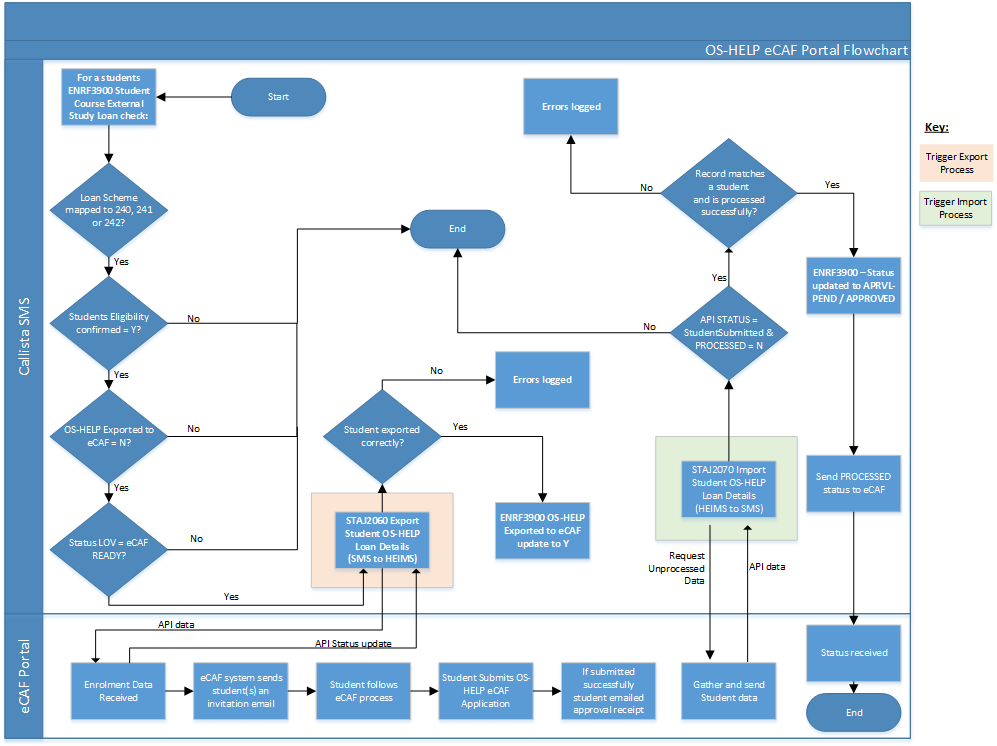
In the flow chart above, it can be seen that students whose details have been successfully exported to the eCAF Portal (via STAJ2060), will need to submit an OS-HELP eCAF application which contains all the data required by HEIMS. This is the 'OS-HELP application form' referred to in the Processing Overview below.
The basic processing steps for STAJ2070 are as follows:
For each eCAF OS-HELP application form imported, the following occurs:
In the OS-HELP application form that the student completes in the Government eCAF Portal, they must provide a TFN or evidence they have applied for a TFN via a Tax File Certificate. This choice is included in the imported student's OS-HELP details by the following fields:
Depending on what was recorded in the eCAF form, and the TFN information that already exists in Callista (in ENRF3900); the following processing occurs:
A. If the eCAF taxFileNumber is populated then:
B. If the eCAF hasAppliedForTaxFileNumber is TRUE then:
| Technical Information
Tribal Callista interacts with the Government Web Services to manage all aspects of dealing with an external API, including authentication when calling the API and managing the response details to correctly record audit details and process error details appropriately. The Government API uses HTTP status codes to indicate the success or failure of a request. Error codes are returned with a JSON object in the body containing a message providing further details on the error. The version 2(1302B-2017) API for the VET Student Loans eCAF provided by the Government eCAF site is used to import the student status information to the Callista SMS. |
Last Modified on 04-Mar-2019 2:17 PM
History Information:
| Release Version | Project | Change to Document |
| 19.1.0.3, 20.0.0.3 & 21.0.0.2 | 2368 - OS-HELP eCAF | New Online Help page |