
| Top of FIN | Index | Table of Contents | Feedback | |
Finance - Special Topics
In this section:
Calculation and Schedule Data can be stored in the database at more than one level, with the level at which it is stored determining the scope of a fee. Different forms and screens act as different 'gateways', each of which allows the entry and access of data at one of the level
Calculation Example
As a very simple example, consider a computer Access Fee with the Fee Type COMP-ACC. This fee has been assigned to two categories: INTRNTL-UG and DOMESTC-UG. Assume that this fee is to be charged at a flat rate of $75 in the FEE-SEM1 Fee Period:
If the rate is entered using the Maintain Fee Types form (FINF2100), then it will apply to both the INTRNTL-UG and DOMESTC-UG Categories and therefore to students in both these categoriesIf the rate is entered using the Maintain Fee Categories form (FINF2800) with DOMESTC-UG selected, then that rate will only apply to students in the DOMESTC-UG Categor
Schedules Example
Schedules can potentially be set up at three levels. To use the Payment Schedule as an example of scheduling the COMP-ACC fee described above:If a schedule is set up using the Maintain Fee Types form (FINF2100), then students in both the INTRNTL-UG and DOMESTC-UG Categories will pay the fee at the same time
If a schedule is set up using the first screen of the Maintain Fee Categories form (FINF2800) with DOMESTC-UG selected, students pay the COMP-ACC charge at the same time as they pay other fees in the DOMESTC-UG Category
If a schedule is set up using the second screen of the Maintain Fee Categories form (FINF2800) with DOMESTC-UG selected, the COMP-ACC charge is paid at a time that applies only to this fee when in this category
To extrapolate from these examples, for calculation and Schedule Data:
| Data can apply to: | Use form: | Level abbreviation: |
| All occurrences of a Fee Type, irrespective of Category | FINF2100 | FTCI
level (Fee Type level) |
| All Fee Types in a particular Category (schedules only) | FINF2800
(1st screen) |
FCCI
level (Fee Category level) |
| A single Fee Type in a particular Category | FINF2800
(2nd screen) |
FCFL
level (Fee Liability level) |
The next section summarises which levels can be used for which data, and the override and other rules that apply.
It is expected that this summary will be most useful once you are reasonably familiar with the forms used in setting up Student Finance data.
| FTCI level | FCCI level | FCFL level | ||
| Schedules |  |
|
See Schedules notes below | |
| . | . | |
|
. |
| Charge Method |  |
. | |
Charge Method and rule must be at same level |
| Charge Method Apportionment | |
. | |
. |
| Payment Rank | |
. | |
. |
| Rule | |
. | |
. |
| Rate | |
. | |
See Calculation notes below |
| Element Ranges | |
. | |
See Element Ranges notes below |
| Define Trigger Type | |
. | . | See Institution Fee notes below |
| Use Triggers | . | . | |
Not applicable to INSTITUTN Trigger Category |
| Tax Exempt check box | |
. | . | Student Contribution Amounts and INSTITUTN Fees |
| . | (
) |
|
|
See Tax notes below |
| Tax rule | |
. | |
See Tax notes below |
Key For Each Row in the Table:
Fee
data can exist at these levels simultaneously
Fee data can exist at either level, but not both
Schedule Notes
For fees with a COMSUPPORT (HECS) System Fee Type or an INSTITUTN System Fee Trigger Category, schedules must be at FTCI level. In these two cases, lack of a particular schedule at this level is taken to mean that the corresponding schedule conditions do not apply for these fees, even where they are included in a Category with a Schedule of the same kind at FCCI level.
Where a Schedule exists at FTCI level, a corresponding schedule cannot be created at FCFL level, and vice versa.
Where a Fee Type has a Schedule at FTCI level, this schedule overrides one at FCCI level for that Fee Type only.
A Fee Liability Schedule at FCFL level overrides a schedule at FCCI level for the corresponding Fee Type only.
Calculation Notes
Fees with either a COMSUPPORT (HECS) System Fee Type or an INSTITUTN System Fee Trigger Category must have calculation details defined at FTCI level. Charge rate and Element Ranges must be specified at the same level. As well as by level, rates can be further differentiated by:
Any combination of Course Code, Course Version, Location, Attendance Type, Attendance Mode, Cohort, Unit, Unit Version, Unit Location and Class. Where the rates are not mutually exclusive, an order of precedence must be set. These attributes are not applicable to Student Contribution Amount, and Course/Unit Code and Version Attributes are not applicable to institution fees
Government Student Status, and for options representing a Student Contribution Amount, by Discipline Band.
Element Ranges Notes
Element Ranges cannot be specified for a fee if:
The System Fee Type is COMSUPPORT (HECS), or
The Charge Method is FLATRAT
and can only be specified at the FTCI level for institution fees.
Institution Fee Notes
Fees with an INSTITUTN System Fee Trigger Category:
Do not have triggers (can use any Charge Method)
Must have all their details defined at FTCI level
Are levied only once, even if a student has more than one current Course Attempt.
Tax Notes
Fees are taxable unless the Tax Exempt check box is set (checked).
If a category (FCCI level) is set as Tax Exempt, all liabilities for the category (at FCFL level) must be Tax Exempt. But if a category is taxable, it can include component liabilities that are Tax Exempt.
For fees with a System Fee Type of COMSUPPORT (HECS) or an INSTITUTN System Fee Trigger Category, tax data is defined at FTCI level and cannot be overridden.
Student Contribution Amounts are exempt from tax, and the Tax Exempt check box defaults to set (checked)
Fees with an INSTITUTN System Fee Trigger Category can be taxable or Tax Exempt
For other than Student Contribution Amounts or institution fees:The value of the Tax Exempt check box at FCFL level overrides that at FTCI level for the same fee
The value of the check box at FCFL level defaults either:
To Tax Exempt, if the Fee Liability is in a Tax Exempt Category, OR
To the value of the check box at FTCI level (but this defaulted FCFL value can be changed)
If applicable, a Tax Rule can be set at either FTCI or FCFL level, but not at both for the same fee
Note: The rates discussed here do not include contract rates established with individual students in the Maintain Contract Fee Assessment Rates form (FINF2900). They do include contracts based on standard rates and established through Admissions (ADMF3660).
Rates for Fee Types are set up in the Define Fee Assessment Rates form (FINF2853), which can be accessed either from the Maintain Fee Types form (FINF2100) or from the Maintain Fee Categories form (FINF2800).
At either of these levels, multiple rates can be specified for a single Fee Type. Rates may be defined on various attributes or criteria.
The criteria available for a Fee Type depends on its System Fee Type, as shown in the table below. Note that if the sets of criteria recorded for a particular fee's rates do not cover all the options, a fee is not incurred for the options not covered. For example, in a multi campus institution, a rate may be defined only for Campus A and Campus B. Students studying at Campus C will not incur the fee
For Fees With OTHER System Fee Types
Select from these criteria:
For Fees With COMSUPPORT (HECS) System Fee Types
Select from these criteria:
For Fees With TUITION System Fee Types
Select from these criteria:
| Order of Precedence |
Course Code |
Version Number |
Location Code |
Attendance Type |
Attendance Mode |
Rate |
| 1 | AA111 | - | Campus A | F/T | - | Rate X |
| 2 | BB222 | 2 | Campus B | - | N | Rate Y |
| 3 | - | - | - | - | - | Rate Z |
| Govt Discipline Bands | Sample
$ value of Charge Rate |
||
| 201 - Deferred all or part of student contribution through HECS-HELP | Rate A | 2520.00 | |
| . | 1 | Rate B | 3356.00 |
| . | 2 | Rate C | 4779.00 |
| . | 3 | Rate D | 5593.00 |
| 202 - Paid the full student contribution upfront with the HECS-HELP discount | . | Rate A | 2520.00 |
| . | 1 | Rate B | 3356.00 |
| . | 2 | Rate C | 4779.00 |
| . | 3 | Rate D | 5593.00 |
| 203 - Paid in full student contribution upfront without the HECS-HELP discount | . | Rate A | 2520.00 |
| . | 1 | Rate B | 3356.00 |
| . | 2 | Rate C | 4779.00 |
| . | 3 | Rate D | 5593.00 |
| Code | Meaning |
| Contribution-liable students from 2005 | |
| 201 | Deferred all or part of the student contribution through HECS-HELP |
| 202 | Paid the full student contribution up-front with the HECS-HELP discount |
| 203 | Paid the full student contribution up-front without the HECS-HELP discount |
| FEE-HELP eligible students from 2005 | |
| 230 | Deferred all or part of Award or Enabling course tuition fee through FEE-HELP |
| 231 | Deferred all or part of Employer reserved place tuition fee through FEE-HELP |
| 232 | Deferred all or part of OLA tuition fee through FEE-HELP |
| 233 | Deferred all or part of BOTP tuition fee through FEE-HELP |
| OS-HELP recipient students from 2005 | |
| 240 | Received loan through OS-HELP |
| Contribution-exempt students from 2005 | |
| 260 | Student in a Commonwealth supported place with an Exemption scholarship (no student contribution to be charged) |
| 261 | A domestic student enrolled in an enabling course (i.e. bridging or supplementary programme) |
| 262 | Student undertaking Work Experience in Industry (WEI) where learning and performance is not directed by, and support is not received from, the provider and for which a student contribution cannot be charged |
| Non-overseas tuition fee-exempt students from 2005 | |
| 270 | Student in a non-Commonwealth supported place with an Exemption scholarship (no tuition fee to be charged) |
| 271 | Student undertaking Work Experience in Industry (WEI) where learning and performance is not directed by, and support is not received from, the provider and for which a tuition fee cannot be charged |
| SA-HELP eligible students | |
| 280 | Deferred all or part of SA-fee for a Course of Study through SA-HELP |
| 281 | Deferred all or part of SA-fee for a Bridging Course for Overseas Trained Professional through SA-HELP |
| Fee-paying non-overseas students | |
| 301 | A domestic student enrolled in a non-award course (other than an Enabling course) |
| 302 | Paid full Award or Enabling course tuition fee |
| 303 | Paid full Employer reserved place tuition fee |
| 304 | Paid full OLA tuition fee |
| 305 | Paid full BOTP tuition fee |
| Fee-paying overseas students | |
| 310 | A fee-paying overseas student who is not sponsored under a foreign aid program, and including students with these awards: IPRS (International Postgraduate Research Scheme); SOPF (Special Overseas Postgraduate Fund); Australian-European Awards Program; and the Commonwealth Scholarship and Fellowship Plan |
| 311 | A fee-paying overseas student who is sponsored under a foreign aid program. Includes those with Australian Development Cooperation Scholarships (ADCOS) and any other Australian foreign aid program for which students are enrolled in Higher Education Providers by the Australian Agency for International Development (AusAID) |
| Pre-2001 RTS students | |
| 320 | A domestic student who received a research HECS exemption prior to 1 September 2000 and continues studying on a student contribution exempt basis under the Research Training Scheme (RTS) as a pre-2001 student. Include internal transfers/upgrades/downgrades (as defined under Element 465) (see Coding Notes) |
| RTS students from 2001 | |
| 330 | A domestic student enrolled under the Research Training Scheme (RTS) from 1 September 2000 (see Coding Notes) |
| VET FEE-HELP eligible students | |
| 401 | A Commonwealth funded VET student enrolled in an Australian Maritime College Special Course |
| 402 | A non-Commonwealth funded VET student in an Australian Maritime College Special Course. |
| 403 | A non-Commonwealth funded VET student in an Australian Maritime College Special Course. |
| VET Fee paying students | |
| 501 | A non-Commonwealth funded VET student in an Australian Maritime College Special Course. |
| 502 | A non-Commonwealth funded VET student in an Australian Maritime College Special Course. |
| 503 | A non-Commonwealth funded VET student in an Australian Maritime College Special Course. |
The first three methods allow the full revenue to be sent to finance via the invoice process and via the Disbursement process.The Draw-Down process inserts a transaction into the Fee Assessment table to record the amount of the loan.The calculation of COFI invoices operates differently, before and after the Draw-Down job.This process does NOT change the Student Status for any students.A snapshot is created by FINJ6240.FINJ6200 – Commonwealth Assistance Notice (CAN)Students’ Statuses, and their payment activities, determine the various processes that are required to take place before FINJ6200 is run. The following information is a discussion of the possible scenarios that should be considered before FINJ6200 is run and CAN notices are sent. This discussion is limited, and should be treated as an attempt to shed light on a complex area of functionality.Under present Callista SMS configuration, a Census Date is defined against the Teaching Calendar that the Unit is associated with. At a designated date after the commencement date of the unit, information on all students enrolled in the unit will be sent off to the government (FINJ6200).Under normal circumstances, and before a Census Date, a Fee Assessment (FINJ3500) is made and a students Payment Schedule (FINJ6111) is run. COFI Invoices (INTJ0021) and Transfer External Finance System Payments to Callista (INTJ0022) will also happen. This processing cycle continuously repeats itself during a fee period.For Census Date, a Loan Draw Down (FINJ6240) is carried out. In a perfect world, (students paid when they said they would pay or not pay when they said they would not pay), there would be no requirement to alter student finance data (Fee Assessment, Person Payment Schedules and COFI), and FINJ6200 would extract data.Unfortunately, it is not a perfect world, nor do students stay with their initial choices.If there were Pre-Submission Date administration changes, such as student enrolments that effect Load in the Teaching Calendar, then Fee Assessment (FINJ3500) would need to be run, then the Persons Payment Schedule (FINJ6111), along with COFI processing, before running the Commonwealth Assistance Notice (FINJ6200).Let’s look at opposites. What happens to the process when students say they will pay, but don’t? When the Loan Draw Down (FINJ6240) runs the Student Status is overridden and a student Status snapshot created (Student Course Attempt – ENRF3110). They now get a Fee Assessment Loan record. Subsequently, the Person Payment Schedule (FINJ6111) needs to be run to allow this change to be made. This reflects that a student debt is now incurred by the loan scheme. Now run FINJ6200.What happens when students say they are not going to pay, but in fact end up paying. If the Higher Education Provider (HEP) has previously recorded the student as not paying, then Person Payment Schedules will show the loan scheme as responsible for the debt. COFI invoices will exist for the loan scheme. The students payment will exist as an unmatched system credit. Running a System Credits Report (INTR0110) will identify this student. There are two options the HEP can carry out. Do nothing and allow the student’s money to stay in credit, or change the student status. If the HEP changes the student status, the Fee Assessment (FINJ3500) will need to be run, then the Persons Payment Schedule (FINJ6111), followed by the COFI Invoices (INTJ0021). Subsequently, run the Loan Draw Down (FINJ6240). Only now can the Commonwealth Assistance Notice (FINJ6200) be run and produce timely data. If FINJ6200 is run without the previous considerations, there is a good chance that the data will be misleading.
| Student Action | Time | SMS Response |
| Starts a unit | Before Census Date | FINJ3500, FINJ6111, INTJ0021 & INTJ0022 |
| No changes | Census Date | FINJ6240 & FINJ6200 |
| Administration changes | Pre- Submission Date | FINJ3500, FINJ6111 & FINJ6200 |
| Say paying, but don’t | Census Date | FINJ6240, ENRF3110, FINJ6111 & FINJ6200 |
| Say not paying, but do (Option 1) | Census Date (HEP - No action) | INTR0110, FINJ6240 & FINJ6200 |
| Say not paying, but do (Option 2) | Census Date (HEP changes Student Status) | INTR0110, FINJ3500, FINJ6111, INTJ0021, FINJ6240 & FINJ6200 |
Fee Disbursement - Formula Examples
ASSESSMENT Formula Type
Note: In order to view the tables below correctly, please read this documentation with the screen maximised.
Course Specific Fees
System Fee Trigger Category = COURSE, UNIT, UNITSET, COMPOSITE
For any Course Specific Fee, Assessment and Payment is on a student Course Attempt basis. Students with a liability for the same fee in more than one course in a Fee Period (for example, with a liability for a Fee Type TUITION in two courses in FEE-SEM2) are assessed for each course independently. They therefore have independent records for assessment and payment relating to each Course Attempt, with Disbursement also operating independently on the basis of each attempt.
For further information on Alternative Disbursement, see the heading 'Special Note on Alternative Disbursement' in FININTR3 - Understanding Student Finance.
For alternative Formula Types, look for the 'Lamp Text' at the bottom of FINF7510 - Maintain Fee Type Disbursement Formulae.
| Fixed Amount Disbursements (Course Fees) | |
| Example based on a fixed amount of $10 for each formula | Total amount to be disbursed |
| PERCOURSE | $10 * 1 (where the student has at least one unit incurring load) |
| PERUNIT | $10 * number of load incurring units studied by student in the course over the Fee Period. |
| CRPOINT | $10 * total Credit Point value of load-incurring units studied |
| EFTSU | $10 * total EFTSU value of units studied |
| EFTSL | $10 * total EFTSL value of units studied |
| * = Multiplied by | . |
For further information on EFTSL, see EFTSL - Equivalent Full Time Student Load (GSFF_EFTSU).
The following table gives suggested combinations of formula components for a Course Fee. Note that the allocation method STUDENT is not relevant for any Course Fee because Disbursement is based on a liability for a single Course Attempt.
| Suggested Formulas (Course Fees) | |||
| Disbursement Method | Disbursement Fixed or % |
Allocation Method | Notes |
| DIRECT - total disbursed amount goes directly to a single specified Organisational Unit | FIXED | PERCOURSE PERUNIT CRPOINT EFTSU |
See 'Fixed Amount Disbursements' table above |
| % | PERCOURSE | Other Allocation Methods are redundant because there is only one recipient of the disbursed amount | |
| COURSEOWN - total amount goes to the owner(s) of the relevant course | FIXED | PERCOURSE PERUNIT CRPOINT EFTSU |
See 'Fixed Amount Disbursements' table above |
| % | PERCOURSE | Other Allocation Methods are inefficient because Disbursement is to owner(s) of a single course, irrespective of Unit Teaching Responsibility or CRPOINT/EFTSU breakdown | |
| UNITTEACH - amount is split across relevant units and goes to departments with teaching responsibility for those units | FIXED | PERCOURSE PERUNIT CRPOINT EFTSU |
See 'Fixed Amount Disbursements' table above |
| % | PERUNIT CRPOINT EFTSU |
PERCOURSE is redundant - it achieves the same result as PERUNIT because the split is always across units | |
Example Scenario
| Student | Kim
Lee (student number 9537754) Enrolled in course M300, studying three units: MA001, MA002, MA003 Assessed debt for TUITION Fee Type for course M300 in Fee Period FEE-SEM2, 1999 = $150 |
| Disbursement Situation |
There
is only one course owner For each unit, teaching responsibility rests with one department |
| Course Details |
Course M300 is 'owned' by Faculty of Business |
Unit Details
| Unit Code | Credit Points | EFTSU |
Teaching Responsibility |
| MA001 | 2 |
0.25 | Department of Accounting |
| MA002 | 1 | 0.125 | Department of Economics |
| MA003 | 1 | 0.125 | Department of Economics |
Disbursement Formula Outcomes
The outcomes below are based on the above scenario. Read each line as a single formula in isolation. These formulas do not constitute a set, but for Percentage Disbursement are based in each case on a gross amount - the assessed debt of $150
Disbursement of Course Fees is always based on an assessment or payment for a single student Course Attempt.
| Formula Each line is a single formula % is based on gross $150 |
Total to be Disbursed ($) |
Allocated Amount |
Recipient | ||
| DIRECT | FIXED - $10 | PERCOURSE PERUNIT CRPOINT EFTSU |
10.00 30.00 40.00 5.00 |
10.00 30.00 40.00 5.00 |
Single nominated account |
| % - 10% of $150 | PERCOURSE | 15.00 | 15.00 | Single nominated account | |
| COURSEOWN | FIXED - $10 | PERCOURSE
PERUNIT CRPOINT EFTSU |
10.00 30.00 40.00 5.00 |
10.00 30.00 40.00 5.00 |
Faculty of Business |
| % - 10% of $150 | PERCOURSE | 15.00 | 15.00 | Faculty of Business |
|
| UNITTEACH | FIXED - $10 | PERCOURSE |
10.00* |
3.33 6.66 |
Dept
of Accounting |
| PERUNIT | 30.00 | 10.00 20.00 |
Dept
of Accounting Dept of Economics |
||
| CRPOINT | 40.00 | 20.00 20.00 |
Dept
of Accounting Dept of Economics |
||
| EFTSU | 5.00 | 2.50 2.50 |
Dept
of Accounting Dept of Economics |
||
| % - 10% of $150 | PERUNIT | 15.00 | 5.00 10.00 |
Dept
of Accounting |
|
| CRPOINT | 15.00 | 7.50 7.50 |
Dept
of Accounting Dept of Economics |
||
| EFTSU | 15.00 | 7.50 7.50 |
Dept
of Accounting Dept of Economics |
||
| * Disbursed amounts may not sum exactly to total amount to be disbursed | |||||
The table above illustrates suggested formulas for the scenario. Although other combinations of the formula components described (Disbursement Method, Fixed or % Disbursement, Allocation Method) can be used, they are less efficient means of achieving the same results, and may result in slightly different totals because of rounding on allocation amounts at a lower level.Generally there will be a mathematical equivalence between Credit Points and EFTSU, and in this situation the two will be interchangeable for percentage disbursement. However if overrides are used for EFTSU or Credit Points (see the documentation about enrolling in Unit Attempts) and do not maintain the concurrence between the two, using EFTSU or CRPOINT in a formula will produce different results.
Institution-Wide Fees
System Fee Trigger Category = INSTITUTN
| Fixed Amount Disbursements | |
| Example based on a fixed amount of $10 for each formula | Total amount to be disbursed |
| STUDENT | $10 * 1 |
| PERCOURSE | $10 * number of courses studied by student in the Fee Period, liable for the fee |
| PERUNIT | $10 * number of units with load studied by student over the Fee Period for all liable courses |
| CRPOINT | $10 * total Credit Point value of units studied and liable for the fee |
| EFTSU | $10 * total EFTSU value of units studied and liable for the fee |
| * = Multiplied by | |
| Note: In all cases, load must be incurred according to Charge Method Apportionment Calendars. | |
| Suggested Formulas (Course Fees) | |||
| Disbursement Method | Disbursement Fixed or % |
Allocation Method | Notes |
| DIRECT - total disbursed amount goes directly to a single specified Organisational Unit | FIXED | STUDENT PERCOURSE PERUNIT CRPOINT EFTSU |
See 'Fixed Amount Disbursements' table above. |
| % | STUDENT | Other allocation methods are redundant because there is only one recipient of the disbursed amount. | |
| COURSEOWN - amount is split between courses studied when the institution fee was incurred | FIXED | STUDENT PERCOURSE PERUNIT CRPOINT EFTSU |
See 'Fixed Amount Disbursements' table above. |
| % | PERCOURSE PERUNIT CRPOINT EFTSU |
STUDENT is redundant because the result is the same as for PERCOURSE. | |
| UNITTEACH - amount is split across relevant units for courses and goes to departments with teaching responsibility for those units | FIXED | STUDENT PERCOURSE PERUNIT CRPOINT EFTSU |
See 'Fixed Amount Disbursements' table above. |
| % | STUDENT PERCOURSE PERUNIT CRPOINT EFTSU |
STUDENT and PERUNIT are interchangeable - the amount is split equally between all units, irrespective of course. For PERCOURSE, the amount is split equally between courses, and then equally across units within courses. |
|
Promotion Discounts
Promotion Discounts offer reduced tuition fees for targeted groups or individuals.
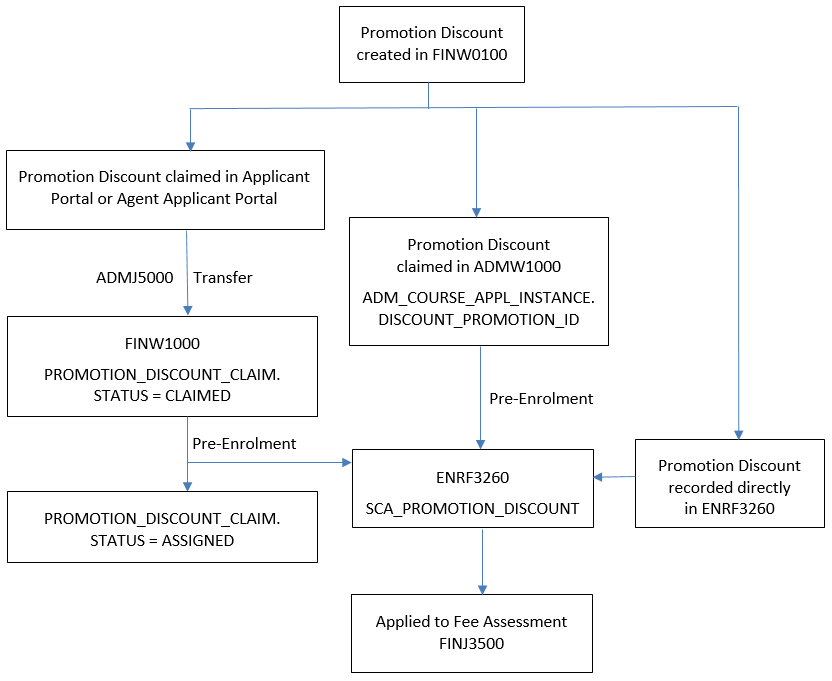
Promotion discounts are created and managed in FINW0100 and they can have a range of associated conditions, such as validity dates and course offering options.
Individual promotion discounts provide the ability to offer a discount to specific people whilst the Agency category provides the ability to offer discounts to specific agencies. Generic Promotion Discounts can be selected by any applicant that has a knowledge of the Promo ID and whose citizenship, course selection, etc. satisfy the criteria defined for the Promotion Discount in FINW0100.
Applicants or their agents can claim the promotion discount by recording the Promo ID against a Course Preference. When the application is saved, a record with a status of CLAIMED is created in the PROMOTION_DISCOUNT_CLAIM table. This can be viewed in FINW1000 and, before pre-enrolment, the status of this claim can be changed to REVOKED on this page.
In ADMW1000, Admission Administrators can claim a promotion discount for an applicant. This inserts a Discount Promotion value in the ADM_COURSE_APPL_INSTANCE table for the applicant.
During pre-enrolment, if a PROMO ID is recorded for the student in ADMW1000 then this discount will be applied and a corresponding SCA Promotion Discount record will be created in the SCA_PROMOTION_DISCOUNT table. This can be viewed in ENRF3260. If there is no Promo ID recorded for an applicant in ADMW1000, then a discount claimed via Applicant or Agent Applicant Portal will have its status changed to APPLIED and a corresponding SCA Promotion Discount record will be created.
| Release Version | Project | Change to Document |
| 22.0.0.0 | 2360 - Software Decommissioning | Removed references to FINJ6190. |
| 20.0.0.2 | 2330 - Discounts at Offer | Updated information for Promotion Discounts. |
| 19.1.0.2 | 2229 & 2233 - Promotion Discounts | Added information for Promotion Discounts. |
| 13.0.0.3, 14.0.0.2, 15.0 | 1834 SA-HELP Fees | Added information for SA-HELP fees and removed references to old fee processing |
| 11.0.0.2 | 1408 - PC98 | Additions to Derived Versus Nominated Course Attributes section |
| 10.1.0.0.0.0 | 1346 - Extended Fee Functionality | Added History Information |
| 8.1.0.0.0.0 | 1192 - Compliance SSPPU | Added 'Elected Student Status' and description |
| 8.0.0.0.0.0 | C16760 | Add, For further information on Alternative Disbursement, see the heading 'Special Note on Alternative Disbursement' in FININTR3 - Understanding Student Finance. Add EFTSL to Fixed Amount Disbursement (Course Fees) table with note referencing EFTSU at gsff_eftsu.htm |
| 7.1.0.0.0.0 | C14583 | Changed references to Inquiry directory for Finf files |
| 7.1.0.0.0.0 | C14440 | Add Special Note to Government section |