
| Top of STA | Index | Table of Contents | Feedback | |
Understanding HE Statistics
This section of the user manual provides an overview of the Statistics Subsystem and its use for the production of Government statistical returns.
This is a highly specialised part of Callista, intended for the use of statistics specialists only.
Statistics Reference Data is maintained in other Subsystems. Refer to the Statistics Subsystem Table of Contents for details.
Topics covered here include:
To Understand VET Statistics select the hyperlink below.
| Understanding VET Statistics |
Users of the Statistics Subsystem and Required Knowledge
The production of Government Statistics is a job for the Specialist Statistics Officer. It requires an intimate knowledge of both the requirements of DEEWR statistical reporting and the data sources within Callista. Users of this Subsystem need to be familiar with the contents of the DEEWR manual. It is the basis upon which this Subsystem is designed. They need a broad understanding of System wide functionality of the operation of the Enrolments and Job Control and Scheduling Subsystems. This manual provides the necessary information in the System Overview, Enrolments Subsystem and Job Control and Scheduling Subsystem chapters. Help for a specific topic can be found using the Index.
Setting up the Statistics subsystem prior to its first use requires some programmer/analyst activity. This is detailed in Statistics Subsystem Data Pre-requisites.
Maintenance of Statistics Related Data in Callista
The entry of data used by the Statistics Subsystem is distributed throughout other Subsystems. For instance, Course and Unit information originates in the Course Structure and Planning Subsystem and is used in the Enrolments Subsystem where students are enrolled in Course and Unit Offerings. Users entering this data do not require detailed knowledge of the Statistics Subsystem.
For the Statistics Subsystem to function, specific reference data must be created and maintained in other Subsystems (for example, specific Calendar Instances and Date Alias Instances must be created in the Calendar Subsystem). These pre-requisites are detailed below. This data is usually created by a System administrator or by the specialist responsible for the Subsystem concerned.
Government Codes, as specified in the DEEWR manual, are recorded throughout the System. In most cases one or more institution defined codes map to a Government Code and it is the institution defined code which is used by the majority of users. Institution and Government codes are usually created and maintained by a System administrator or by the specialist responsible for the Subsystem concerned.
Pre-requisites for Government Statistics Processing
Setup
Specific data must be created in other Subsystems in order for the Statistics Subsystem to function correctly. This data is detailed in Statistics Subsystem Data Pre-requisites and must be established prior to running data 'snapshots'.
Statistics Reference/Control Data
Two reference data/control forms related to Statistics Snapshots exist in the Statistics Subsystem:
The Maintain Government Snapshot Control Form must be used to set up control details for a particular submission prior to the Government Submission Snapshot process (STAJ0110).
The Government Enrolments Statistics Process
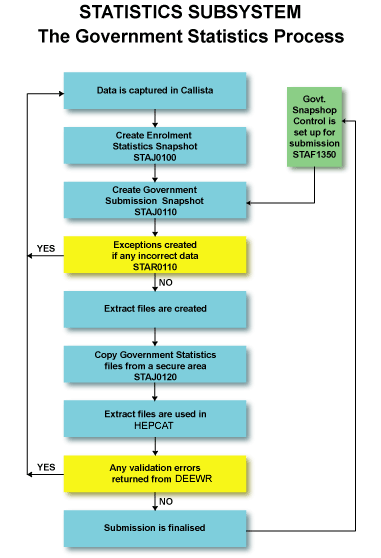
The broad processes involved in preparing a Government Statistics Submission are described here. Where more detailed explanations are required, refer to How the Government Statistics Process Works.
Government reportable data is maintained routinely in Callista. For example, student Addresses and Course and Unit details are maintained as part of the business of the institution. A set of specific codes used for Government reporting is also maintained in the System. Examples include, Government Citizenship Codes (STAF1129) and Government Attendance Types.
Enrolment Statistics Snapshots
Preparations for Government Statistics Submissions commences with the creation of an Enrolment Statistics Snapshot. These snapshots are produced as frequently as the institution requires (by running STAJ0100 in the Job Control and Scheduling Subsystem) and can be used for pre-submission data checking (by utilising the Government Statistics Process to identify HEPCAT validation errors) or other institution purposes such as enrolment analysis. The snapshots record Course and Unit data for all students except those with Unit Attempt Status UNCONFIRM, INVALID or DUPLICATE at the point in time at which the capture process takes place. Each record is broken down to the level of Teaching Responsibility and Discipline Group within a Student Unit Attempt within a Student Course Attempt. Precise information about the data included in the Enrolment Snapshot is contained in How the Government Statistics Process Works.
The Enrolment Snapshots also derive a Government Reportable check box for each record. This flags 'Y' those records to be considered for inclusion in a Government submission and flags 'N' those records which are not Government reportable. The Government reportable check box may also be set to 'W' (Warning) for some records. This indicates that manual checking of these records should be performed. The Reset Government Reportable check box form (STAF1250) is used to view Warning records. Where required, the Statistics Officer can use the same form to set the Government Reportable check box to 'X' (exclude - not Government reportable). It is not necessary to change the check box (for Warnings which are deemed reportable) to 'Y', as records which remain 'W' are reported in the submission by default. The Government Reportable check box for each record is re-evaluated when the Government Submission Snapshot is run, with the exception of those previously changed to 'X'.
An Enrolment Statistics Snapshot Exception Report (STAR0100) is produced which lists those records not included in the snapshot, as errors. A reason is provided for each exception, permitting identification and resolution of problems.
Unwanted Enrolment Snapshots should be deleted using the Delete Enrolment Statistics Snapshots process (STAJ0010) on a regular basis, due to the large amount of storage space they consume.
Government Submission Snapshots
A Government Submission Snapshot (STAJ0110) is the snapshot used to create many of the extract files used in HEPCAT. These snapshots can be created as required and used in HEPCAT to check data at any time prior to the actual submission being produced. (Note: For a particular submission year, number and type, only one Government snapshot is retained in the System. Running the Government snapshot process again, overwrites the existing version.) The data to be included in a snapshot is determined by the parameters specified in the Maintain Government Snapshot Control form (STAF1350), the parameters specified when job STAJ0110 is run and by database routines which extract and derive data in accordance with the file specifications detailed in the DEEWR manual. The documentation for STAF1350 provides some general information on data selection but the DEEWR manual should be referred to for specific detail. Precise information about the data included in the Government Snapshot is contained in How the Government Statistics Process Works.
Processing the Government Submission
Production of the DEEWR Submission involves determining that a particular Enrolment Snapshot reflects the enrolment situation at the Census Date. This Enrolment Snapshot may by necessity have been created after the Census Date, to allow for processing of retrospective Enrolment/Discontinuation transactions (by staff with Override Variation Cut-off Date authority). The Government Submission Snapshot process (STAJ0110) is run via Job Scheduler. It uses the chosen Enrolment Snapshot to identify which records to consider for reporting in the Government Submission (via the Government Reportable check box), and as a source of some data. The remaining required data is extracted or derived from other parts of the System. Other checks are performed by the System to determine if records should be included in the Government submission (for example, 'Is unit enrolled as at the Census Date?). These are detailed in the DEEWR manual.
Creating the Government Extract Files
Having created the Government Submission Snapshot, the following jobs are run in Job Scheduler (regardless of the submission number and type) to create the extract files required for HEPCAT.
(Note: Not all files are created for each submission. Refer to the documentation for each file and the DEEWR manual - File Specifications, for a list of those files included in each submission.)
| Job Name |
Description |
Details |
| STAJ0040 |
Create Course of Study File |
|
| STAJ0050 |
Create HELP Due File |
|
| STAJ0070 |
Create Past Course Completions File |
|
| STAJ0090 | Create Student Enrolment file | Details |
| STAJ0130 | Create Commonwealth Learning Scholarship File | Details |
| STAJ0140 | Create Student Load/Liability File | Details |
| STAJ0150 | Create Unit of Study Completions File | Details |
| STAJ0160 | Create OS-HELP File | Details |
| STAJ0170 | Create eCAF File | Details |
The extract files are output to a secure directory specified by the 'KEEP' environment variable. Files in the 'KEEP' directory cannot be accessed by users. The files can be copied from this secure directory, to a user directory in which they can be accessed, using the Copy Extract Files From Secure Area process (STAJ0120). The user directory is specified by the 'USER' environment variable (refer to your system administrator).
Use of extract files in HEPCAT is covered by 'Steps in Preparing and Sending Returns to DEEWR and the ATO', of the DEEWR manual.
Errors produced in HEPCAT should be fixed by amending data in the 'live' database and repeating the process above.
Note: After any of the Statistics jobs have been run, the Job Run Log should be checked. It will identify both the reasons for a job failing, and missing and incorrect data.
Finalising the Government Submission
The final step in Callista, following the forwarding of a submission to DEEWR is to 'close off update access' to the submission. This is done by setting the Completion Date for the submission in the Government Snapshot Control Form (STAF1350). A logical date to use would be the date the submission was forwarded to DEEWR.
If the Completion Date is not set against the Submission, data from this Submission will not be included in any subsequent Revisions Submissions. (See the Revisions Process below.)
The Government Admissions Statistics Process
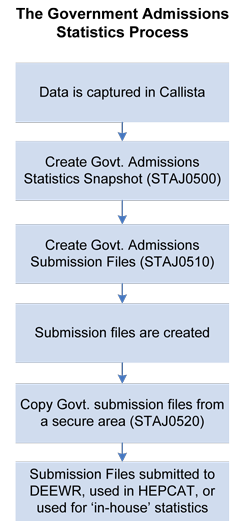
The broad processes involved in preparing a Government Admissions Statistics Submission are described here. Where more detailed explanations are required, refer to How the Government Admissions Statistics Process Works.
Government Admissions Statistics Snapshot
Preparation for the Government Admissions Statistics submissions commences with the creation of an Admissions Statistics Snapshot. This snapshot is produced as frequently as the institution requires (by running the Create Government Admissions Statistics Snapshot job (STAJ0500). Precise information about the data included in the Admissions Snapshot is contained in How the Government Admissions Statistics Process Works.
Snapshots can be used to check data, to trial data through the Government Admissions submission process for the purpose of ensuring data integrity, and as a source of statistical information if the institution desires.
At an appropriate time, one of the snapshots is selected as being representative of the Admissions situation and is used to produce the Government Admissions submission files (STAJ0510).
Creating the Government Admissions Submission Files
Having run the STAJ0500 job (see above), the Create Government Admissions Submission Files job (STAJ0510) is run to create submission files from the admissions data extracted by the Government Admissions Statistics Snapshot job. Depending on the parameters selected, the following submission files can be created and are used by institutions to report to DEEWR:
The filename of each submission file is hhhhXXyyyy.pnnnnn where:
The submission files are created in the jobs KEEP directory.
Copying the Government Applications and Offers Files from Secure Area
After running the STAJ0510 job (see above), the Government Applications and Offers Files from Secure Area job (STAJ0520) is run to copy the Admissions submission files from the secure (KEEP) directory to a directory that is accessible by users.
This job is expected to be run when access to the submission files is required. This is typically for:
Last Modified on 17 October, 2006
History Information
| Release Version | Project | Changes to Document |
| 11.0.0.3, 11.1.0.3, 12.0.0.2, 12.1 | 1573 - University Applications and Offer Data Collection | Added new section (The Government Admissions Statistics Process) and related information. |
| 11.0.0.2.0.0 | cal 24748 | Added STAJ0170 to Government Extract File table |
| 9.1.0.0.0.0 | 1230 - DEEWR 2007 | Major changes to 'The Revison Process' and following |
| 8.0.0.0.0.0 | 1084 - SLE-Help Revisions File | Changed Create SLE/HELP Revisions File to Create Revisions File. Added detail and diagrams for original and revision submissions |
| 8.0.0.0.0.0 | 0949 - OS Help | Added staj0160 to table, renamed staj0050 in table |