This page introduces referencing in writing at university, outlines the reasons why it is a critical skill for academic writers. The examples on this page include how to do in-text citations, bibliographical references, and more.
Introduction
Before you start, watch the video and complete the self evaluation task to get started.
Self evaluation
- Task: Reflect on your existing referencing knowledge. How would you rate your confidence in the following scenarios?
Why we reference
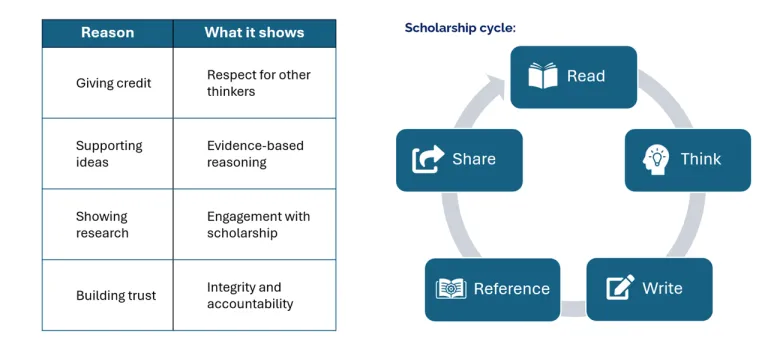
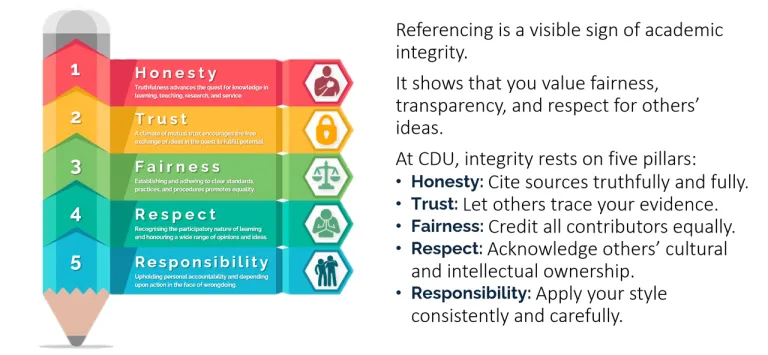
Referencing isn’t just about punctuation or formatting; it’s how you show where your ideas come from and how you build trust with your reader. When you reference, you demonstrate honesty, fairness, and responsibility, which are core parts of academic integrity.
Useful resources
Check your understanding
Understanding referencing
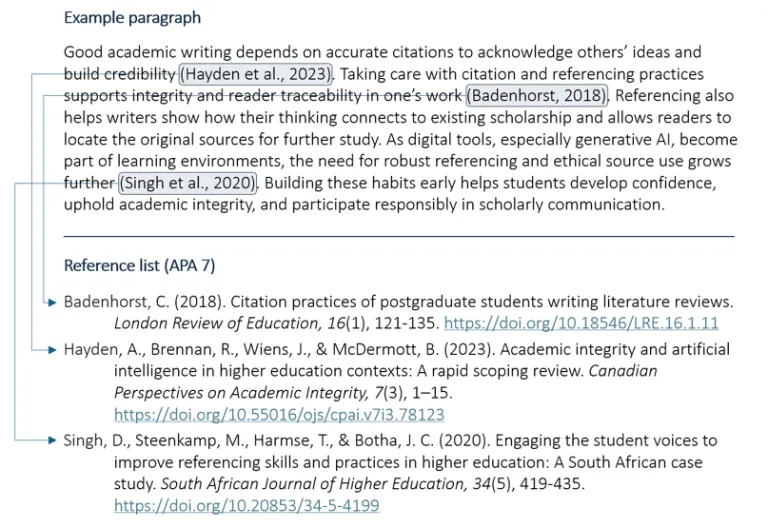
Most references have two parts:
- In-text citation: This appears in your writing where you use an idea or quote.
- Reference list entry: This appears at the end of your work with full source details
They work together, and it is usually not allowed to have one without the other.
Tip: Different units use different styles. Check your unit outline or lecturer’s instructions.
Useful resources
Check your understanding
Referencing, integrity, & scholarship
Useful resources
Check your understanding
Common challenges (and how to fix them)
It’s completely normal to find referencing confusing at first. Even experienced students need reminders.
Building a reference: Step by step
Once you know the pattern and steps, you can build almost any reference with confidence.
Every reference answers five key questions:
- Who created the work?
- When was it created?
- What is it called?
- Who published it?
- Where can it be found?
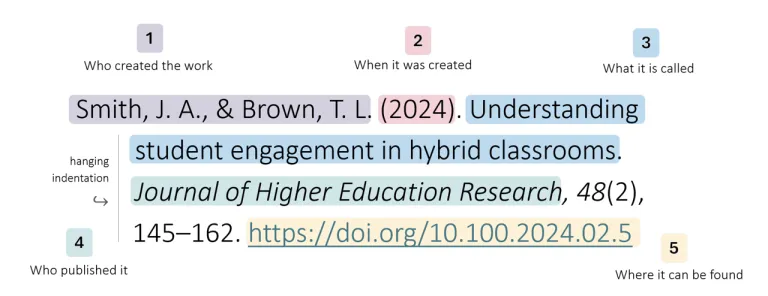
That simple logic stays the same across most of the referencing styles. What changes is just the punctuation and order.
| Step | What to do | |
| 1. | Collect your details | Record author, year, title, and source location. |
| 2. | Identify the source type | Decide if it’s a book, article, website, or other source type. |
| 3. | Apply the correct style | Use your required referencing style consistently. |
| 4. | Check punctuation & italics | Match examples from the CDU Referencing Guide. |
| 5. | Alphabetise & format neatly | Order by author surname; use hanging indents. |
Useful resources
Check your understanding
In-text Citations
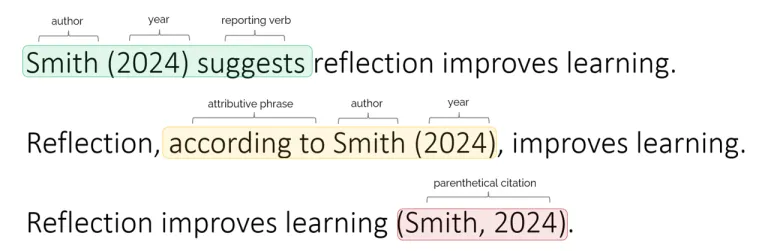
In-text citations link your ideas to the sources that support them. They show the reader where each idea came from and help your writing flow by blending evidence naturally into your work. They can be placed at the start, middle, or end of sentences.
Useful resources
Check your understanding
Tools, tips & tech
Reference tools can make your work faster and more organised, but they can’t think for you. Use them to support your learning, not replace it. Even the best tools make mistakes, so always check your references against CDU’s style guides before you submit.
Reference managers

Reference Managers help you collect, store, and format sources. These are ideal for large projects and help you to stay organised. CDU provides EndNote for students and staff and also offers basic support for Mendeley and Zotero. We also offer EndNote training workshops. You can find and register for one workshop.
Quick builders

Quick Builders create single references online in just a few clicks. They’re perfect for short assignments or when you only have a few sources. Tools such as ZoteroBib and Grammarly Citation Generator can save time, but always double-check punctuation and formatting against CDU’s style guides before submission.
Browser extensions

GenAI tools

GenAI Tools, such as Copilot, can help you draft bibliographical references if given proper instructions about the desired referencing style. However, they can also produce errors, so use them critically. Copilot is available through Office 365 using your CDU credentials (your students.cdu.edu.au account).
Get help & keep learning
Referencing is a skill that grows with practice, and you don’t have to master it alone.
CDU has expert staff and practical resources to help you at every stage of your study journey. Whether you need feedback on your draft, guidance on EndNote, or clarity about academic integrity, help is just a click away.
| Support Type | What they can help with | How to connect |
| Academic & Research Librarians | Expert advice on referencing styles, EndNote setup, and research tools. | Book an appointment |
| Language & Learning Advisors | Guidance on paraphrasing, synthesising, and writing with confidence. | Book an appointment |
| Library Referencing Guide | A comprehensive guide to all things referencing at CDU. | CDU Referencing Guide |
| Integrity Resources | Learn about CDU’s academic integrity policy and values. |
Over to you
Reflect on what you have learned in this material and consider how you can use it in your own work.
Revisit the self-analysis quiz at the top of the page. How would you rate your skills now?
Did you know CDU Language and Learning Advisors offer a range of study support options?
https://www.cdu.edu.au/library/language-and-learning-support